DMARC without breaking your own mail
How I took a small SaaS from a monitoring-only DMARC record to p=reject on evidence: an SPF record one lookup over the limit, DKIM signed in the app, a tag that quietly cancels the policy, and what 3,718 report messages did and did not prove.
- security
- devops
- webdev

My app sends invitation, password-reset and alert emails, and for a long time nothing seemed wrong with them. They were sent, they mostly arrived, and the DMARC record said p=none. That setting tells receivers to do nothing about mail that fails authentication, so a forged email claiming to come from my domain got delivered exactly as often as a real one. Anyone could have sent a password-reset email in my app's name with their own link in it, and my DNS would not have asked a single receiver to stop it.
p=none is how you start, and it is not useless. With a rua= address in the record, it gets you daily aggregate reports from the receivers that send them, and since February 2024 Gmail has required a DMARC record from anyone sending it more than 5,000 messages a day. But Gmail accepts none for that rule, so a domain can meet it while protecting nothing.
Three DNS records do the work together. SPF lists the servers allowed to send for your domain. DKIM puts a signature on each message, which receivers check against a public key you publish. DMARC tells receivers what to do with a message that passes neither, and its idea of passing is stricter than either check on its own: the domain that passed has to match the one in the visible From address. Without that match, a forger can pass SPF for a domain they own and still put yours in the From line.
Getting from none to a policy that refuses forged mail took three steps, and two of them were fixing things I had not known were broken.
The SPF record that was already failing#
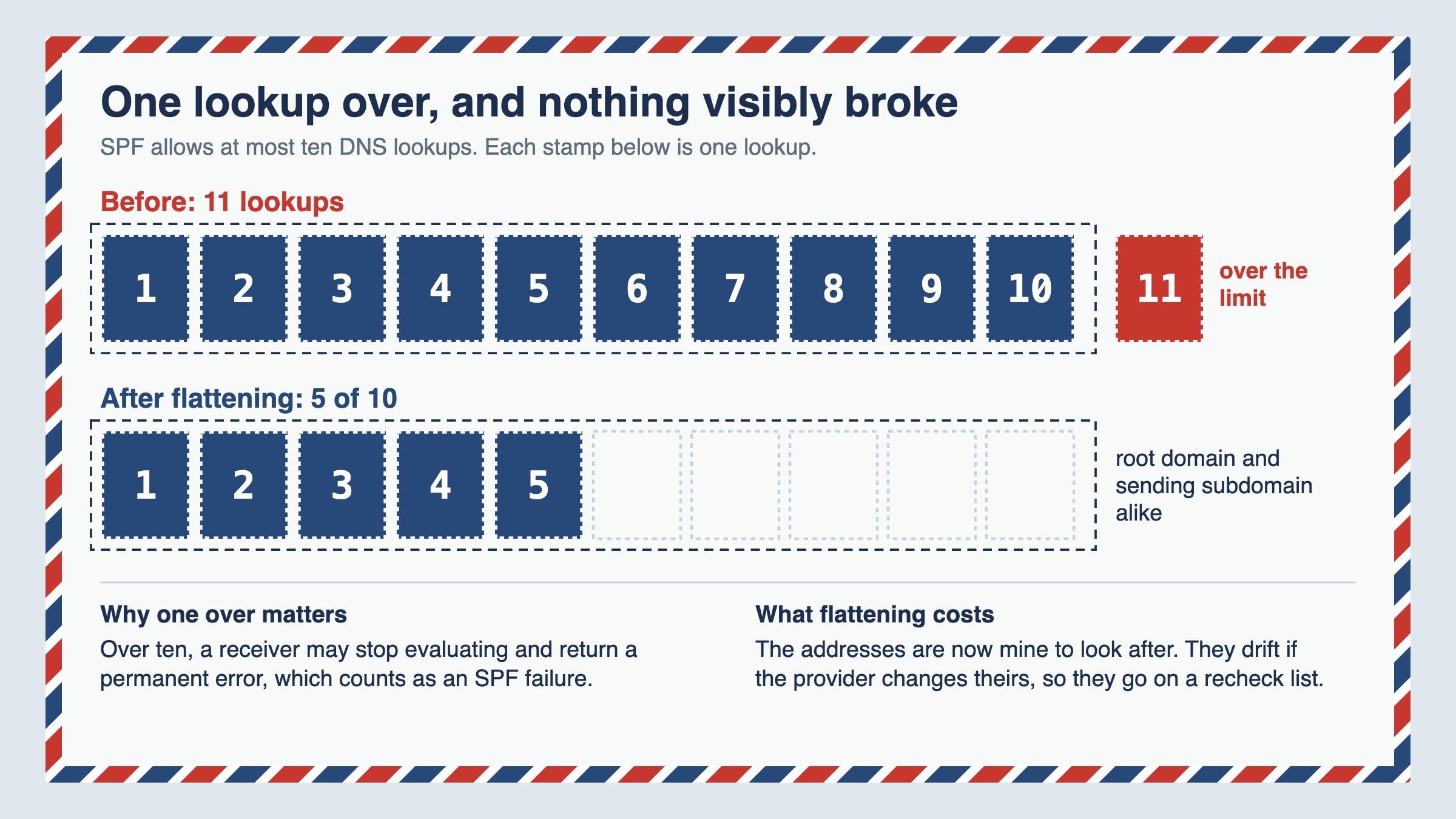
SPF comes with a hard rule: evaluating the record may cause at most ten DNS lookups. Every include: costs at least one, and the includes contain more includes. Go over ten and a receiver is entitled to stop and return a permanent error, which counts as an SPF failure.
Mine needed eleven. It was a single lookup over and nothing visibly broke, which is exactly why nobody had noticed, but a policy resting on SPF would have been resting on a permanent error.
The fix was to flatten part of the chain: replace the nested includes with the addresses they resolve to, kept in records I control. That brought it to five lookups out of ten, on the root domain and the sending subdomain alike. The cost is that those addresses are now mine to keep current, so they sit on a list of things to recheck.
DKIM, signed by the app#
My relay is a pass-through. It forwards mail without signing it, so the signing has to happen before the message leaves the app. With Nodemailer, that is a dkim option on the transport, driven by three environment variables: the domain, a selector and the private key, stored base64-encoded because a multi-line PEM breaks in an .env file.
When you rotate the key, publish the new public key in DNS before you deploy the new private key. The other order gives receivers signatures they cannot verify until DNS catches up.
Also decide what happens when the key is missing. If any of the three variables is unset, my app logs a warning and sends unsigned mail, so local development and CI work without the key. In production that fallback is weaker than it looks: under a strict policy, an unsigned message passes DMARC only if SPF passes and aligns, so a production deploy without the key should fail instead of warning. Mine only warns today.
Before going any stricter I checked the one thing that proves the setup is coherent: the private key on the server derives to exactly the public key published in DNS.
Quarantine first, and two traps in the record#
With SPF valid and DKIM signing, the record went from p=none to p=quarantine on 12 September. Quarantine asks receivers to treat failing mail as suspicious, which usually means the spam folder rather than a refusal. Each receiver makes its own call and some may reject or drop it anyway, but a mistake on my side was more likely to cost a message in a spam folder, where someone could still find it.
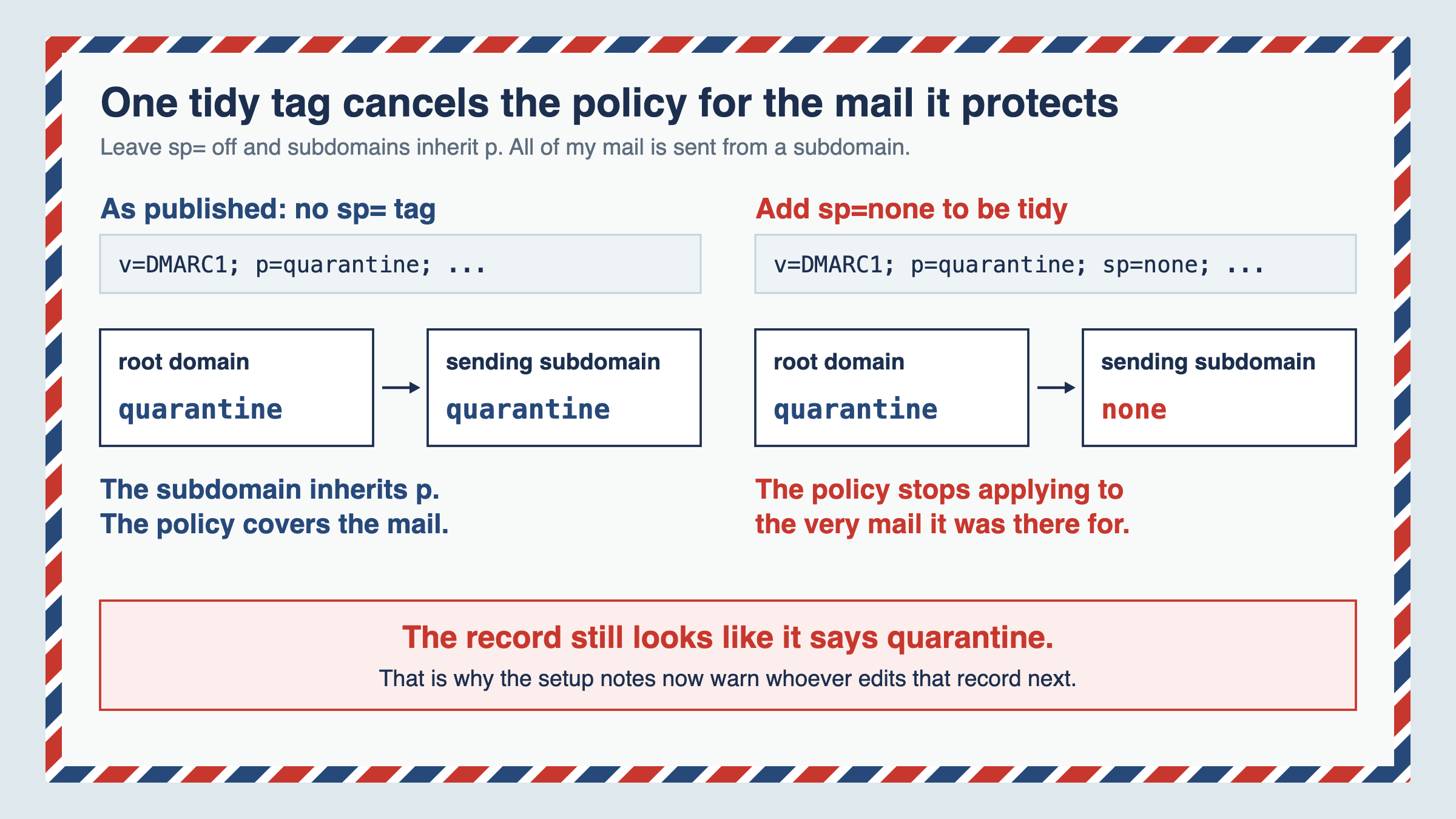
The setting that matters most here is one I deliberately left out. The sp= tag sets the policy for subdomains, and without it subdomains inherit p. My mail is sent from a subdomain. Add sp=none to be tidy, and the policy silently stops applying to the very mail it was there to protect, while the record still looks like it says quarantine.
The second trap is quieter still. Add a new DMARC record beside the old one instead of editing it, and receivers discard both, so the domain behaves as if it had no policy at all. The setup notes now warn whoever edits that record next about both.
Reading the evidence, then reject#
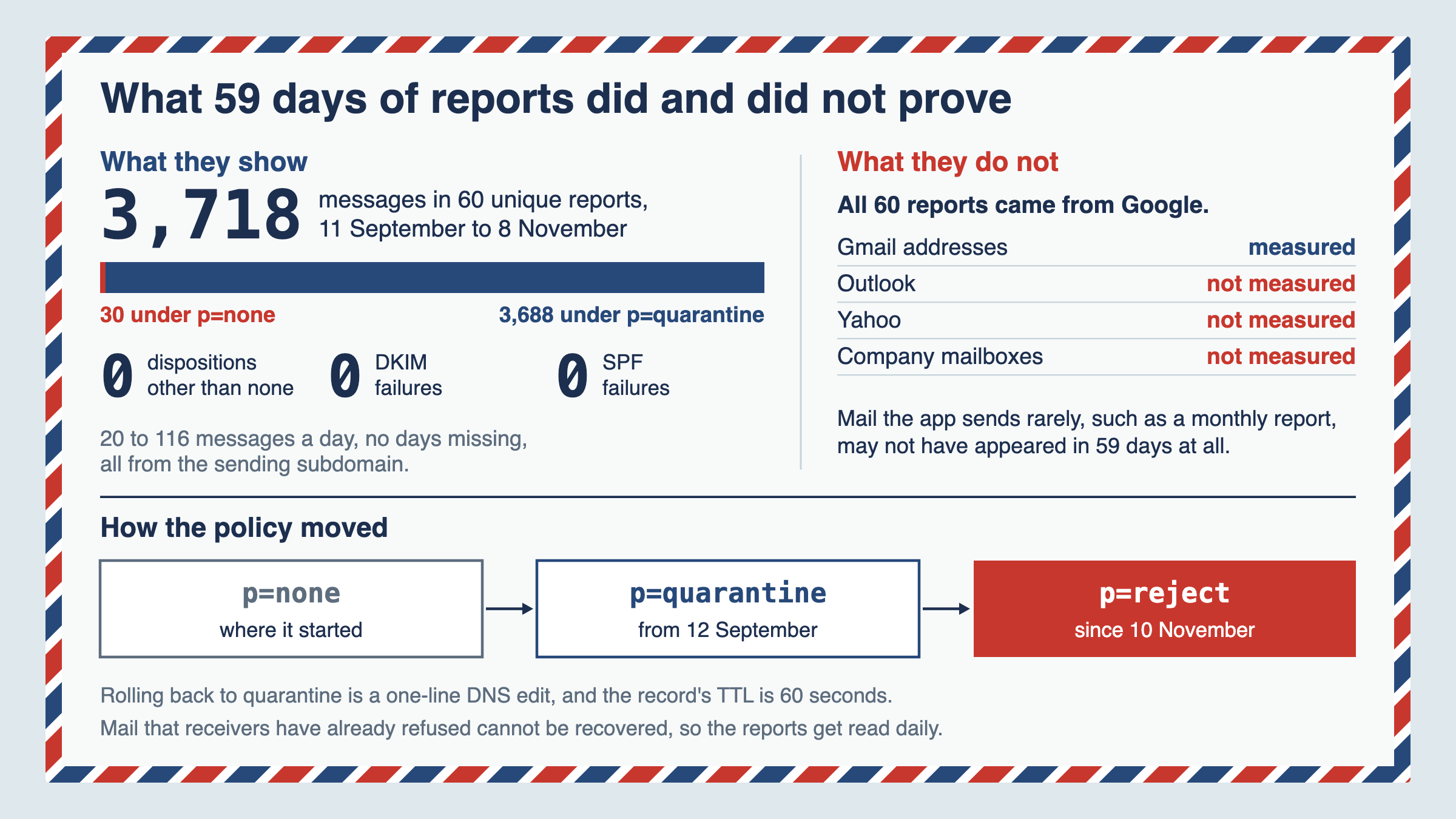
Aggregate reports arrive as zipped XML, one a day per reporting provider. Before changing anything again I read all 60 unique reports from 11 September to 8 November, with no days missing: 3,718 messages, of which the first 30 were evaluated under p=none and the other 3,688 under p=quarantine. There were no rows with a disposition other than none, no DKIM failures and no SPF failures. Every message came from the sending subdomain, at between 20 and 116 a day.
The one row that made me look twice was a sending address I had not seen before. It passed both checks, and it sat inside the range my relay publishes for its own servers, so it was the relay and not someone sending as me. Catching that kind of change is what the reports are for.
On 10 November the record moved to p=reject:
v=DMARC1; p=reject; rua=mailto:dmarc@example.com; fo=1; adkim=r; aspf=rMy earlier plan was to stage it with pct=25 and raise the percentage over a week or two. I dropped that, because not every receiver honoured pct, and the updated DMARC standard published in May 2026, RFC 9989, removes the tag altogether. What made going straight to reject reasonable is the record's TTL of 60 seconds. If my own mail starts bouncing, rolling back is a one-line DNS edit that most receivers should see within minutes, though a resolver that cannot refresh the record may keep serving the old one for longer. What a rollback cannot do is bring back mail that was already refused, which is why the reports get read every day for the first few weeks.
What that evidence does not show#
All of those reports came from Google. They cover mail sent to Gmail addresses and say nothing about Outlook, Yahoo or company mailboxes. That mail leaves through the same relay with the same signature, so I expect it to pass, but I have not measured it. Mail the app sends rarely, such as a monthly report or an alert type that has not fired yet, may not have appeared in 59 days at all. If you can, send one of each kind yourself before you enforce, and look for it in the next report.
The other gap is one I could open myself. If I ever set up a mail client to send as my domain through another provider, that mail leaves servers that are not in my SPF record, and under reject it does not land in spam. It never arrives. Adding the provider's include and its DKIM key is not enough on its own. Many providers send from their own bounce address and sign with their own domain, so SPF and DKIM both pass for the provider and DMARC still fails for you. Set up a return path on your domain or have the provider sign as your domain, then send a test message and check its headers say dmarc=pass before you rely on it. And check you have lookups to spare.
Check your own#
It takes under two minutes and you only need a terminal:
dig +short TXT _dmarc.yourdomain.com
dig +short TXT yourdomain.com | grep spf
If the first returns nothing, that domain has no DMARC record of its own. For a subdomain, receivers then use the parent domain's record, so run it there and read its sp=, or its p= if there is no sp=. If it returns two, you effectively have none. If it says p=none, you are gathering evidence and not yet protecting anything, and if it has an sp= tag, read what it says. Look for a rua= address too: without one, nobody sends you reports, and with one, only the receivers that take part will.
Then count the lookups in your SPF record. Every include:, a, mx, ptr, exists and redirect= costs one, and so does each of those inside the records an include pulls in. One over the limit fails as quietly as mine did.
Likes are saved in your browser only.
This post is also published on dev.to.
Keep reading
- 28 October 202612 minOctober brought the awareness after allCybersecurity Awareness Month 2026 brought PHP2Shell, an exploited BeyondTrust zero-day and two critical Next.js RCEs. My dependency audit stayed green for eight days while the Next.js fix sat on npm, and on a repository I had not patched yet, Dependabot was still silent days after the database caught up.
- 21 October 20269 minThe three questions you get asked at 2amWhen something goes wrong, three questions get asked and most teams cannot answer any of them. Why application logs are not an audit trail, how the record becomes a liability, and five questions a non-technical leader can ask about it.
- 14 September 202611 minWhat my WAF actually blocked, and what my app already stops on its ownI ran 26 attack payloads against a local replica of a production app with ModSecurity on and off. It blocked 12: five my app already rejected, and seven it stopped a step earlier than the app's own defences. The class behind most real breaches never showed up in either column.