The CI/CD Security Lab: Scanning, Policy and a Deploy Gate That Fails Closed
Add static analysis, dependency, container and full-history secrets scanning to an app that already ships, set the blocking policy from a measured baseline instead of tool defaults, triage every finding, and gate the deploy so that only an explicit pass gets through.
- Platform
- Self-hosted
- Target
- A Next.js + NestJS web app
- Difficulty
- Medium
- OS
- Web
- GitHub Actions
- Semgrep
- Trivy
- Gitleaks
- GitHub CLI
- jq
- sast
- dependency-scanning
- container-scanning
- secrets-scanning
- ci-cd-security
- vulnerability-triage
This lab adds a security pipeline to a web app that already ships: static analysis, dependency and container scanning, and a full-history secrets scan on every pull request, every push to main and once a week. Then it wires the deploy so that it refuses anything the scan has not explicitly passed. That last step sounds like a formality, and it is the one that broke. Days after I built the original on a production app, a scan was cancelled halfway through, the deploy gate read the cancellation as a pass, and the deploy went ahead. In module 6 you build that gate, break it the same way, and fix it so that it accepts exactly one answer.
The order matters as much as the tools. You audit the app before writing any YAML, scan it as it stands so you know what you are dealing with, write the blocking policy against those numbers, and only then build the workflow. A pipeline that fails every pull request on day one gets switched off by the end of the week, and a switched-off pipeline protects nothing.
Scan only what you own or have written permission to scan. If the secrets scan turns up a live credential, treat it as compromised: rotate it first and triage after. Never paste a secret into CI output, an issue or a chat, all of which are readable by more people than you think.
Module 0: What you need (expand before you start)
A repository you own, with an app in it. The workflow expects two Node projects, backend/ and frontend/, each with its own package.json and lockfile, because that is the layout it was built for. A different layout changes the list of project folders in one job and nothing else.
No app of your own? Fork OWASP Juice Shop. It is deliberately vulnerable, so every scanner has plenty to report. Six things to know before you start:
- Its two projects are the repository root and
frontend/, so use.andfrontendwherever this guide saysbackendandfrontend. The root scan also readsfrontend/, so findings there are counted twice; that is fine for practice. - It ships no lockfiles: its
.npmrcsetspackage-lock=false. Trivy reads lockfiles, notpackage.json, so it finds nothing until you generate them. Module 1 shows how. Its.gitignorealso listspackage-lock.json, so commit the new lockfiles withgit add -f. - A fork brings the upstream project's workflows with it. Delete everything in
.github/workflows/before you enable Actions on the fork, or they all run. - Its default branch is
master, while the workflow triggers, the deploy gate and the branch protection in this guide all saymain. Rename it in your fork before you start, using the commands below this list. - In a fork,
gh pr createand GitHub's own "Compare & pull request" button aim at the upstream project by default, which would send your lab changes to Juice Shop's maintainers. Rungh repo set-defaultonce, and check the base repository before every pull request. - Every vulnerability in it is there on purpose, so most of your triage will read "accepted: intentional training vulnerability". The mechanics are the same; the judgement calls are thinner than on a real codebase. Module 5 has a shortcut for accepting them in bulk.
To rename the branch and point gh at your fork (use your own username and repository name):
gh api -X POST repos/YOU/YOUR-FORK/branches/master/rename -f new_name=main
git branch -m master main
git fetch origin && git branch -u origin/main main
git remote set-head origin -a
gh repo set-default YOU/YOUR-FORK
If you are doing this on a real product and want to write it up, publish against a stand-in like the one above, and keep real hostnames, tenant details and configuration out of anything public.
Local tools for the baseline, at the versions the workflow pins where it pins one:
pipx install "semgrep==1.172.0"
brew install trivy gitleaks jq gh
gh auth login
Your GitHub plan. Nothing in the pipeline itself needs a paid plan, with two exceptions on private repositories. Uploading results to the Security tab needs GitHub Advanced Security, which is why this pipeline reports into the pull request instead. Branch protection, in module 7, needs GitHub Pro or Team. On a public repository, such as a Juice Shop fork, both are free.
What you are building#
Three triggers feed five scan jobs that run in parallel: static analysis of the source, a dependency scan for each project, a scan of the third-party container images the app runs, and a secrets scan across the whole git history. Results land in the job summary and in a single comment on the pull request, and a severity policy decides what blocks. Separately, the deploy refuses to ship a commit unless that commit's scan concluded success.
| Job | Tool | Looks at | Blocks on |
|---|---|---|---|
| Static analysis | Semgrep | Application source | ERROR-severity findings (HIGH or CRITICAL on Semgrep's newer scale) |
| Dependencies × 2 | Trivy | Each project's lockfile, dev dependencies included | Critical findings with a published fix |
| Upstream images | Trivy | Third-party images from a tracked manifest | Nothing: warn-only |
| Secrets | Gitleaks | Full git history | Any unsuppressed finding |
Two design rules hold it together. The workflow is separate from the app's own build and deploy workflows, so deleting it changes nothing about how the team ships: a security gate that can take production deploys down with it is a gate people delete rather than fix. And every scanner's own exit code is ignored, so the gate step in each job is the only place the policy lives.
1. Audit before you build#
Before writing any YAML, find out what is actually deployed, from the repository and the server rather than from memory. The description you were given is often wrong. I was told the app I did this on was containerised, and it was not: only one upstream service ran in a container, configured on the server rather than in the repository. That correction changed the scope: the app's own dependencies needed lockfile scanning, and the container work became "scan the images we pull" rather than "scan the images we build".
Answer three questions.
Which projects ship, and where are their lockfiles?
find . \( -name package-lock.json -o -name yarn.lock -o -name pnpm-lock.yaml \) -not -path "*/node_modules/*"If a project has no lockfile, generate one without running any install scripts, and commit it. --package-lock=true overrides an .npmrc that switches lockfiles off:
cd backend && npm install --package-lock=true --package-lock-only --ignore-scriptsOn a real project, a missing lockfile is a finding in its own right: nobody can say exactly which dependency versions shipped.
Which container images does production run, and who builds them? Check the FROM lines in any Dockerfile, any docker-compose.yml, and the server itself with docker ps. An image you build and an image you pull are scanned in different places and fixed in different ways.
What do the existing workflows do? Read every file in .github/workflows/. You are adding a workflow next to them, so you need to know which triggers they share and what a deploy actually waits for. You will not change them, apart from one gate step in the deploy in module 6.
Checkpoint: you can list, in writing, every project that ships, its lockfile, and every image production runs.
Tick each box once you have captured that shot; it syncs with the screenshot checklist automatically.
2. Take a baseline#
Now scan the repository exactly as it stands, locally, before the pipeline exists. The numbers you get here are what the blocking policy in module 3 is written against, and what shows later that the work changed anything. Keep the reports outside the repository, so a baseline full of findings can never be committed by accident.
mkdir -p ~/scan-baseline
cd path/to/your/repo
Static analysis. Semgrep with the registry rule sets needs no account or token:
semgrep scan \
  --config=p/owasp-top-ten --config=p/typescript --config=p/react \
  --config=p/nodejsscan --config=p/secrets --config=p/javascript \
  --exclude=node_modules --exclude=.next --exclude=dist \
  --metrics=off --json -o ~/scan-baseline/semgrep.json

jq '[.results[].extra.severity] | group_by(.) | map({(.[0]): length}) | add // {}' \
  ~/scan-baseline/semgrep.json
Dependencies. Scan each project twice, with and without dev dependencies. Trivy leaves dev dependencies out by default and Dependabot does not, which is how the two tools can report different numbers for the same commit. Dev dependencies do not ship to production, but they run on every developer's machine and inside CI, where the repository and its secrets are reachable, so they count.
for project in backend frontend; do
  trivy fs --scanners vuln --format json \
    -o ~/scan-baseline/trivy-$project-prod.json $project
  trivy fs --scanners vuln --include-dev-deps --format json \
    -o ~/scan-baseline/trivy-$project-all.json $project
done

jq '[.Results[]?.Vulnerabilities[]?.Severity] | group_by(.) | map({(.[0]): length}) | add // {}' \
  ~/scan-baseline/trivy-backend-all.json
Upstream images. One scan per image from your audit, at the tag production actually runs. Trivy pulls the image from the registry itself, so Docker does not need to be running:
trivy image --scanners vuln --format json \
  -o ~/scan-baseline/image.json postgres:16-alpine   # your image and tag here
Secrets, across the whole history. A secret that was committed and later deleted is still in every clone, so a working-tree scan misses the case that matters most:
gitleaks detect --source . --log-opts="--all" --redact \
  --report-format json --report-path ~/scan-baseline/gitleaks.json
jq length ~/scan-baseline/gitleaks.json
Then read the code yourself. Scanners match patterns. They do not know which of your behaviours are only meant to exist in development. Search for anything that changes behaviour based on a request header, a flag or an environment check, and read each hit:
grep -rnE "headers\[['\"]x-|req\.(get|header)\(['\"]x-|NODE_ENV|isDev|skipAuth|bypass" \
  --include='*.ts' --include='*.tsx' --include='*.js' \
  --exclude-dir=node_modules --exclude-dir=.next --exclude-dir=dist \
  backend frontend
For each hit, ask one question: is this gated on the runtime environment, or on something a caller can send?
On the real product: the history scan found a live credential, a webhook secret that a debug statement had logged in plaintext and that had been committed. It was rotated before any pipeline work continued. Reading the code found three separate development conveniences switched on by a request header, or by nothing at all, instead of by the runtime environment, and all three were live in production. No scanner reported any of them.
Checkpoint: four kinds of baseline report in ~/scan-baseline/, a count from each, and a written list of anything the code reading turned up.
Tick each box once you have captured that shot; it syncs with the screenshot checklist automatically.
3. Write the policy before the workflow#
Blocking on every high-severity finding sounds rigorous. Against a real baseline it fails every pull request from the first day, and the person whose unrelated change is blocked cannot fix any of it. The pipeline then gets disabled, which is worse than a looser policy that stays on. So the policy comes from the baseline, not from a tool default: block on what a pull request's author can act on, warn on the rest, track the rest to a date, and tighten as the backlog shrinks.
| Finding | Policy | Why |
|---|---|---|
| Any secret | Blocks | A leaked secret is an incident, not a backlog item. |
| Static analysis, ERROR (or HIGH, CRITICAL) | Blocks | The most serious matches, fixable in the same change. |
| Dependency, critical with a published fix | Blocks | There is a version to move to. |
| Dependency, critical without a fix | Warns | Nothing the author can do. Tracked instead. |
| Upstream images | Warns | Pulled, not built here: fixed by a version bump or a compensating control. |
| Everything else | Warns | Tracked to a review date. |
Write it down as SECURITY_PIPELINE_POLICY.md at the repository root, with a triage log at the bottom, because the policy is a decision the team should be able to read and argue with rather than something buried in YAML:
# Security pipeline policy

## What blocks a merge
- Any unsuppressed secret in the full git history.
- ERROR-severity static analysis findings, and HIGH or CRITICAL on Semgrep's newer scale.
- CRITICAL dependency vulnerabilities with a published fix.

## What warns
Everything else, including all upstream image findings.

## Every finding gets exactly one outcome
- Fixed: link the commit.
- Accepted: a technical reason and a review date. No date, no acceptance.
- False positive: the reasoning, stated, so the next reviewer does not redo it.

## Triage log
| Finding | Decision | Reason | Decided | Review |
|---|---|---|---|---|
| CVE-XXXX-YYYY in <package> | Accepted | Dev-only build tool, no runtime path | 2026-10-14 | 2027-01-14 |
Then create the three files the workflow reads, even if two of them start out empty, because the workflow fails when a file it names is missing:
-
security/.trivyignorefor accepted dependency and image findings. Give every entry an expiry, and Trivy reports the finding again on that date, so an accepted risk comes back for review on its own instead of staying hidden:# Dev-only build tool, no runtime path. See the triage log. CVE-XXXX-YYYY exp:2027-01-14 -
.gitleaksignorefor triaged secrets, one fingerprint per line, copied from theFingerprintfield of the Gitleaks report (commit:file:rule:line). Lines starting with#are comments, so put the reason above each one. -
security/images.txt, every third-party image from your audit at the tag production runs, one per line. It needs at least one image: an empty list gives the image job nothing to run, and the workflow errors. If the app pulls no images at all, delete theimages-manifestandimagesjobs in module 4, and takeimagesout of the report job'sneeds.# Images production pulls but does not build. One line brings an image into scope. postgres:16-alpine
Tick each box once you have captured that shot; it syncs with the screenshot checklist automatically.
4. Build the workflow#
The complete workflow is security.yml in my case-study repository, with every decision commented. Copy it to .github/workflows/security.yml, change the project list in the dependency job if your folders differ, and read it alongside this module, because each part below is a decision rather than a default.
Triggers, permissions and concurrency. Pull requests and pushes to main are obvious. The weekly schedule is there because new vulnerabilities are disclosed against code that has not changed: without it, a repository that stops receiving commits stops being assessed.
on:
  pull_request:
    branches: [main]
  push:
    branches: [main]
  schedule:
    - cron: "0 6 * * 1" # Mondays 06:00 UTC
  workflow_dispatch:

permissions:
  contents: read

concurrency:
  group: security-${{ github.ref }}
  # Never cancel on main: the deploy gate reads this run's result. Module 6.
  cancel-in-progress: ${{ github.ref != 'refs/heads/main' }}

env:
  SEMGREP_VERSION: "1.172.0"
  GITLEAKS_VERSION: "8.30.1"
The token is read-only by default, and the one job that needs to write, the pull request comment, asks for that permission on its own. Tool versions are pinned so that a scan that passed yesterday cannot fail today for reasons unrelated to the code.
Pin every action by commit SHA. A tag like @v7 can be moved by whoever controls the action, so an action pinned by tag is a standing grant of write access to your pipeline. Every uses: line in the file is pinned like this, with the version in a comment:
- uses: actions/checkout@3d3c42e5aac5ba805825da76410c181273ba90b1 # v7.0.1Static analysis keeps policy in one place. Semgrep exits non-zero whenever it finds anything, so its exit code is ignored and a separate step applies the policy. One change from the original file is worth making here. Some Semgrep rules now report severity as CRITICAL, HIGH, MEDIUM or LOW instead of ERROR, WARNING or INFO, and a single scan can return both scales: running the baseline command from module 2 returned a MEDIUM alongside ERROR and WARNING findings. A gate that only counts ERROR would let a serious finding on the new scale straight through, so count HIGH and CRITICAL as well:
- name: Gate
  run: |
    ERRORS=$(python3 -c "import json;print(sum(1 for r in json.load(open('semgrep.json'))['results'] if r['extra']['severity'] in ('ERROR','HIGH','CRITICAL')))")
    echo "Blocking SAST findings: $ERRORS"
    [ "$ERRORS" -eq 0 ] || { echo "::error::$ERRORS blocking SAST finding(s)"; exit 1; }
The full file also writes a findings table to the job summary, and reports any file Semgrep failed to parse. A parse failure means that file was only partly analysed, and a silent gap in coverage is worse than a finding.
Dependencies scan one project per job. A matrix runs a separate job for each lockfile, so each gets its own report, its own summary and its own gate, and a failure names the project that caused it. Dev dependencies are switched on through an environment variable, because the Trivy action has no input for that flag:
strategy:
  fail-fast: false
  matrix:
    project: [backend, frontend]
# ...
env:
  TRIVY_INCLUDE_DEV_DEPS: "true"
The gate counts only critical findings that have a fixed version. A critical with no fix is something the author of the pull request cannot act on, and blocking them on it only teaches people to bypass the gate.
Images come from the manifest. A small job reads security/images.txt into a matrix and the scan runs once per image, so bringing a new image into scope is a one-line change anyone can review. It never blocks, but its summary reports how many findings have a published fix, because that number separates version drift, which a bump resolves, from inherited risk that needs a compensating control.
Secrets scan the full history with a verified binary. The checkout uses fetch-depth: 0 so that the whole history is there to scan. The Gitleaks GitHub Action needs a licence key for repositories owned by an organisation, so the workflow downloads the release binary instead and checks it against the SHA-256 published with the release:
- name: Install Gitleaks
  env:
    GITLEAKS_SHA256: "551f6fc83ea457d62a0d98237cbad105af8d557003051f41f3e7ca7b3f2470eb"
  run: |
    archive="gitleaks_${GITLEAKS_VERSION}_linux_x64.tar.gz"
    curl -sfL "https://github.com/gitleaks/gitleaks/releases/download/v${GITLEAKS_VERSION}/${archive}" -o "$archive"
    echo "${GITLEAKS_SHA256}  ${archive}" | sha256sum -c -
    tar -xzf "$archive" -C /usr/local/bin gitleaks
Bump the version without updating the checksum and the install fails outright, which is the right direction for a supply-chain check to fail in. The report is written with --redact, because it is uploaded as an artifact that anyone with access to the repository can download.
Results go where people already look. The last job collects the result of every scan and posts one table to the pull request, updating it in place on each push rather than adding a new comment. A hidden marker in the comment body is how it finds its own comment again. It is the only job with pull-requests: write.
Why not the Security tab? Uploading results there, as SARIF, needs GitHub Advanced Security on a private repository. On the real product the API answered
403 "Advanced Security must be enabled for this repository". Results have to land where people already look, so they land in the pull request.
Commit the workflow and its three files on a branch and open a pull request. Expect the first run to fail: that is your baseline arriving in CI. The dependency counts should be close to the -all scans from module 2; small differences come from Trivy's vulnerability database updating between runs. Work through module 5 on this branch until the run is green, then merge.
Checkpoint: all five scan jobs run on the pull request, and one comment appears with a result for each check.
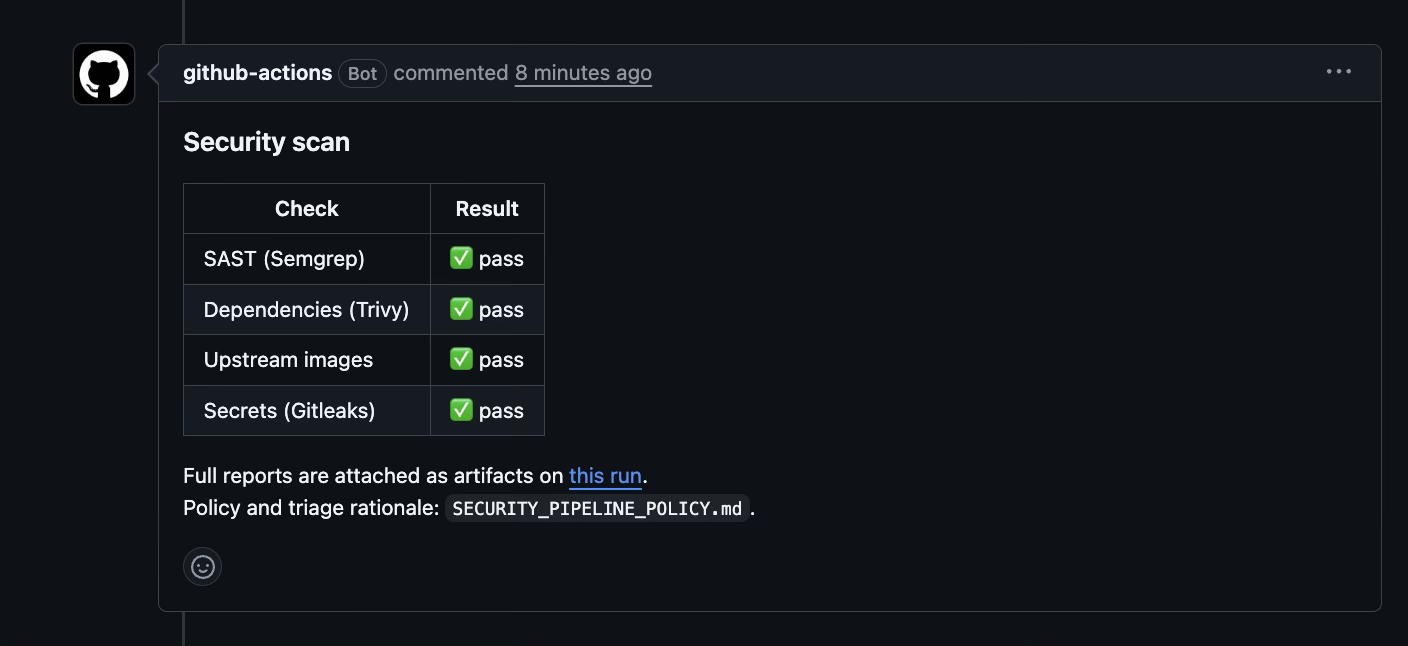
Tick each box once you have captured that shot; it syncs with the screenshot checklist automatically.
5. Triage every finding#
Every finding ends in exactly one of the three outcomes from the policy, and each one is written down.
Fixed is the default: upgrade the package, change the code, rotate the secret. Most of the dependency count disappears this way, because a dozen findings in one package are one upgrade decision, not a dozen problems. The workflow's summary groups findings by package for exactly that reason.
Accepted needs a reason a reviewer can check and a date to look again: an entry in the triage log, and a line in security/.trivyignore with an exp: date that matches the review date.
False positive gets the same treatment. For a secret that turns out to be a test fixture, add its fingerprint to .gitleaksignore with a comment saying why. For Semgrep, put a nosemgrep comment on the line it flagged, naming the rule's full ID from the report, with the reason on the line above. Name the rule: a bare nosemgrep silences every rule on that line, including ones that have not been written yet.
// False positive: the template is a build-time constant, never user input. See the triage log.
const html = renderTrusted(template); // nosemgrep: <full rule ID from the report>
A suppression with no reason attached is not triage. It is a deleted finding nobody will look at again, and six months from now someone will ask why a critical is still open. The answer should already be in the repository.
Only if you are using Juice Shop: accept the deliberate findings in bulk. If you are working on a real product, skip this and go straight to the real-product notes below. A scan of its full history reports a couple of hundred secrets, all of them training material, and writing a reason for each would take a day and teach you nothing. So accept them as a batch, say so in the policy file's triage log, and keep the one-by-one treatment for a codebase where each finding could be real. Three commands do it, using the baseline reports from module 2:
# Secrets: every fingerprint in the report, under one comment
{ echo "# Deliberate training secrets. Accepted as a batch, stand-in run."
  jq -r '.[].Fingerprint' ~/scan-baseline/gitleaks.json | sort -u; } > .gitleaksignore

# Dependencies: the criticals that have a fix, each with an expiry date
{ echo "# Deliberate training vulnerabilities. Accepted, stand-in run."
  jq -r '[.Results[]?.Vulnerabilities[]? | select(.Severity=="CRITICAL" and .FixedVersion) | .VulnerabilityID] | unique[] | . + " exp:YYYY-MM-DD"' \
    ~/scan-baseline/trivy-.-all.json; } > security/.trivyignore

# Static analysis: the files with ERROR findings, plus the tests
{ echo "# Deliberate training vulnerabilities. Accepted as a batch, stand-in run."
  echo "test/"
  jq -r '.results[] | select(.extra.severity=="ERROR") | .path' ~/scan-baseline/semgrep.json | grep -v '^\.github/' | sort -u; } > .semgrepignore
Replace YYYY-MM-DD with a review date a few months out. The test/ line is there because a custom .semgrepignore replaces Semgrep's built-in defaults, which skip test folders. Leave it out and about twenty more ERROR findings appear from the test suite. On a trial run against a fresh clone, these three took the blocking counts for secrets, critical dependencies and ERROR-severity static analysis to zero. That is the right way to get a stand-in repository green, and the wrong way to treat a product you ship. A whole-file ignore also hides any new finding in those files, which a training app can live with and a product cannot. On a real codebase, suppress each accepted finding with a nosemgrep comment that names the rule, or have the gate report only findings that are new since a commit with semgrep scan --baseline-commit.
If you run these three commands before you open the pull request, the first run is green. If you want to watch it fail first and then go green, which makes a better screenshot for module 4, open the pull request before you create the ignore files and add them in a second commit.
On the real product:
- The image job had first been written to install its scanner with
curl ... | sh, and Semgrep'sgha-curl-pipe-shellrule flagged it as anERROR. It was right: that line runs whatever the URL serves at run time, with no integrity check. It was fixed by switching to the SHA-pinned action. A security pipeline should not model the thing it warns about. - One critical remains, in the upstream database image, and the results below explain why it is accepted rather than fixed.
Checkpoint: a green run on the pull request, merged, and a green run on main. Every suppression in the repository has a reason next to it.
Tick each box once you have captured that shot; it syncs with the screenshot checklist automatically.
6. Gate the deploy, break it, then make it fail closed#
A scan that nothing waits on is a report. To make it a control, the deploy has to refuse a commit whose scan did not pass. This module builds that gate the way I first built it, breaks it the way it broke on the real product, and fixes it.
Build the gate the obvious way. If you already have a deploy workflow, the gate is a new first step in the job that ships main. If you do not, create .github/workflows/deploy.yml with a deploy step that only prints, and put your real deploy there later:
name: Deploy

on:
  push:
    branches: [main]

permissions:
  contents: read
  actions: read # to look up the Security run for this commit

jobs:
  deploy:
    runs-on: ubuntu-latest
    steps:
      - name: Wait for this commit's security scan
        env:
          GH_TOKEN: ${{ github.token }}
          SHA: ${{ github.sha }}
        run: |
          for attempt in $(seq 1 60); do
            run=$(gh api "repos/$GITHUB_REPOSITORY/actions/workflows/security.yml/runs?head_sha=$SHA&event=push&per_page=1" \
                  --jq '.workflow_runs[0] // {}')
            status=$(jq -r '.status // "missing"' <<<"$run")
            conclusion=$(jq -r '.conclusion // "none"' <<<"$run")
            [ "$status" = "completed" ] && break
            sleep 20
          done
          [ "$status" = "completed" ] || { echo "::error::No completed security scan for $SHA"; exit 1; }

          # The obvious check, and the bug: list the bad outcomes, let the rest through
          case "$conclusion" in
            failure|timed_out) echo "::error::Security scan finished as $conclusion"; exit 1 ;;
          esac
          echo "Security scan did not fail. Deploying."

      - name: Deploy
        run: echo "Deploying $GITHUB_SHA" # your real deploy goes here
Read the case block and it looks reasonable: it stops the deploy on the outcomes that mean the scan found something. Now find the outcome it forgot.
Break it, with the printing stub rather than a real deploy, because before the fix this test really does deploy. Push a commit to main, wait for its security run to start, and cancel it while it is still scanning:
git commit --allow-empty -m "test: deploy gate" && git push
SHA=$(git rev-parse HEAD)
until RUN=$(gh run list --workflow security.yml --commit "$SHA" --event push \
              --json databaseId --jq '.[0].databaseId // empty') && [ -n "$RUN" ]; do
  sleep 3
done
gh run cancel "$RUN"
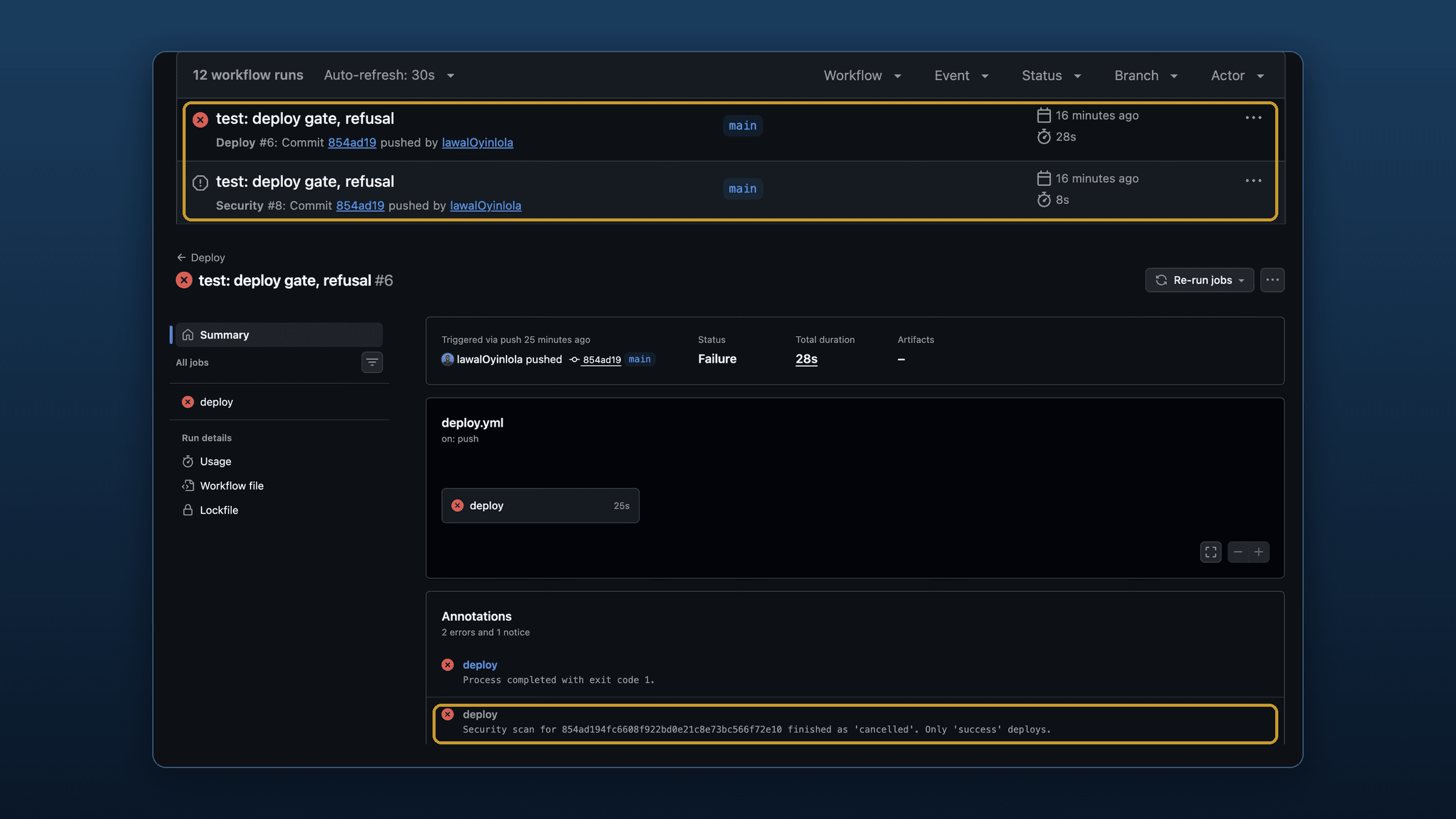
Watch the deploy workflow. The security run finishes as cancelled, which is not on the list, so the gate prints Security scan did not fail. Deploying. and ships a commit that was never fully scanned.

Two runs for the same commit, one cancelled and one that shipped. That pair is the bug.
On the real product, nobody cancelled anything by hand. The concurrency setting was cancel-in-progress: true everywhere, meant to stop duplicate scans on a busy branch, and a merge to main cancelled the security run for that merge commit mid-scan while the deploy for that exact commit was waiting on it. The gate saw cancelled, did not recognise it as a failure, and let the deploy through. No vulnerable code reached production, because the same commit had already been scanned clean on its pull request. But a commit that had genuinely failed its scan could have got the same free pass.
Fix it on both sides, because the cause and the logic are two separate bugs.
The cause is the concurrency line you already have from module 4: it still cancels superseded runs on feature branches and pull requests, where nothing gates a deploy, but never on main. One gap remains even so. GitHub keeps at most one running and one pending run in a concurrency group, and when a newer run queues behind a pending one, it cancels the pending one, whatever cancel-in-progress says. A burst of merges can still leave a cancelled scan on main. If you would rather that never happened, give every commit on main its own group, at the cost of running those scans side by side:
concurrency:
  group: security-${{ github.ref == 'refs/heads/main' && github.sha || github.ref }}
  cancel-in-progress: ${{ github.ref != 'refs/heads/main' }}
The logic is the real fix, and it is what makes that remaining gap safe. A list of bad outcomes is incomplete by construction: cancelled, skipped, stale, neutral and action_required all fall through it, along with whatever GitHub adds next. Requiring the one good outcome is complete. Replace the whole gate step with this:
- name: Require a passing security scan for this commit
  env:
    GH_TOKEN: ${{ github.token }}
    SHA: ${{ github.sha }}
  run: |
    for attempt in $(seq 1 60); do
      run=$(gh api "repos/$GITHUB_REPOSITORY/actions/workflows/security.yml/runs?head_sha=$SHA&event=push&per_page=1" \
            --jq '.workflow_runs[0] // {}')
      status=$(jq -r '.status // "missing"' <<<"$run")
      conclusion=$(jq -r '.conclusion // "none"' <<<"$run")
      if [ "$status" = "completed" ]; then
        if [ "$conclusion" = "success" ]; then
          echo "Security scan passed for $SHA."
          exit 0
        fi
        echo "::error::Security scan for $SHA finished as '$conclusion'. Only 'success' deploys."
        exit 1
      fi
      echo "Security scan is '$status', waiting ($attempt/60)"
      sleep 20
    done
    echo "::error::No completed security scan for $SHA after 20 minutes."
    exit 1
Every path that is not an explicit success ends in exit 1: a cancelled or failed scan, a scan that never started, one still running after twenty minutes, and an API error such as a wrong workflow file name.
Re-test in both directions. Run the break test again: the deploy now stops with finished as 'cancelled'. Only 'success' deploys. Then push a clean commit and let its scan finish: the deploy must still go through. A fix that only proves the bad path is blocked has not proved the gate still opens. To ship the commit whose scan you cancelled, re-run its scan with gh run rerun "$RUN", then re-run its deploy once the scan passes.
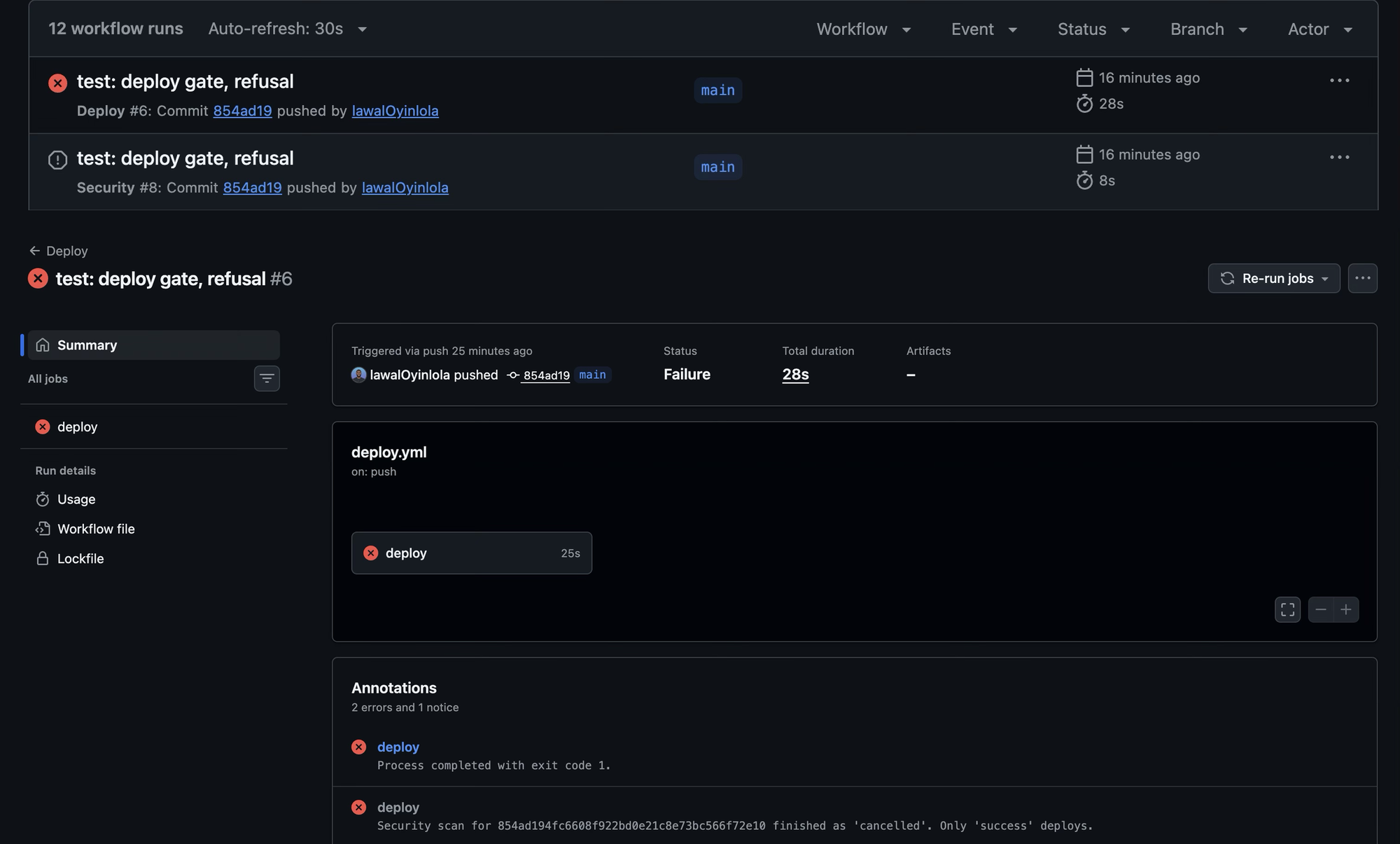
The same cancel, and this time the deploy fails with the reason in plain words.
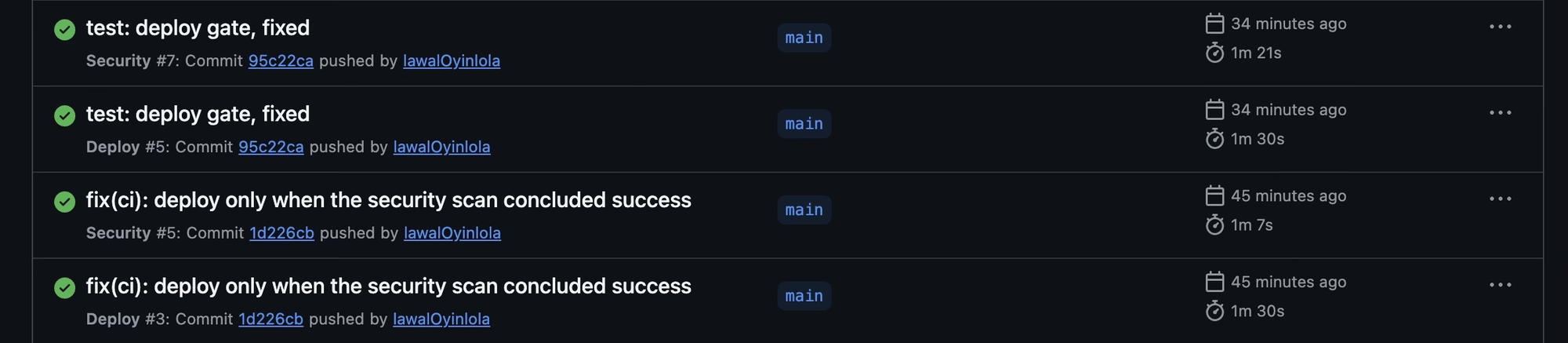
And a commit whose scan was left alone still deploys, which is the half of the test that shows the gate opens.
Tick each box once you have captured that shot; it syncs with the screenshot checklist automatically.
7. Make the gate impossible to route around#
Everything so far assumes nothing reaches main without going through the pipeline. If someone can push straight to main, the pull request checks are advice, and the urgent fix is exactly the change that will skip them. Protect the branch on GitHub itself, not by agreement.
A required check is matched by name, so let the workflow report at least once before you require it: require a name that never reports and every pull request waits forever. Read the exact names GitHub recorded for the latest commit on main:
gh api repos/OWNER/REPO/commits/main/check-runs --jq '.check_runs[].name'Require every scan job: static analysis, each dependency scan, secrets and the upstream image scan. The image scan is still warn-only, because its gate never fails on findings, but requiring it means the job has to run and finish, so a broken or deleted image job blocks the merge instead of passing silently. Leave out the report and manifest jobs, which scan nothing, and the deploy, which only runs on main. Then require a pull request before merging, block force-pushes and deletions, and include administrators. On a small team the bypass that gets used is the owner's, under time pressure. You can set this under Settings → Branches, or with the API:
gh api -X PUT repos/OWNER/REPO/branches/main/protection --input - <<'JSON'
{
  "required_status_checks": {
    "strict": true,
    "contexts": ["paste the blocking check names from the command above"]
  },
  "enforce_admins": true,
  "required_pull_request_reviews": { "required_approving_review_count": 0 },
  "restrictions": null,
  "allow_force_pushes": false,
  "allow_deletions": false
}
JSON
A review count of zero suits a team of one: every change still goes through a pull request and its checks, without needing a second person to approve it. Treat any pull request that changes .github/workflows/ as a change to the gate itself, and review it that way.
8. Prove it works#
Three tests, each with a result you can read for yourself.
A secret blocks the pull request. On a throwaway branch, commit a key-shaped string. It is random, not a real credential, but it matches the pattern Gitleaks looks for, and confirming that locally first means a green run later is not a false comfort:
git switch -c test/secrets-gate
printf 'api_key = "%s0"\n' "$(LC_ALL=C tr -dc 'A-Za-z0-9' </dev/urandom | head -c 31)" > leak-test.txt
gitleaks detect --no-git --source leak-test.txt --redact   # expect one finding, generic-api-key
git add leak-test.txt && git commit -m "test: fake key for the secrets gate"
git push -u origin test/secrets-gate && gh pr create --fill
The Secrets job fails, the pull request comment shows it, and because that check is required, GitHub will not let you merge. Clean up with gh pr close --delete-branch.
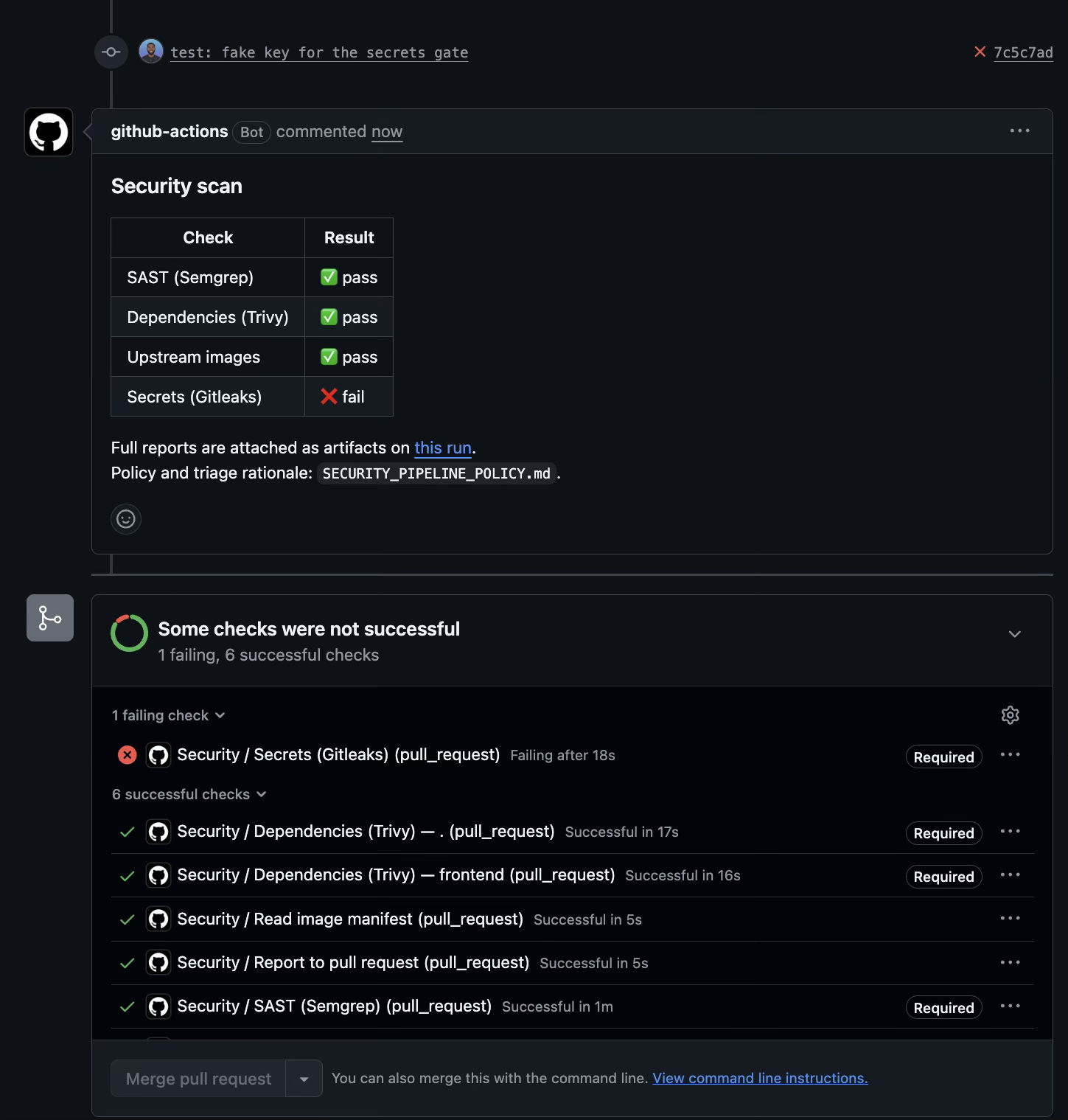
Nobody can skip the pipeline. Commit directly to main and push:
git switch main && git pull
git commit --allow-empty -m "test: direct push" && git push   # expect: protected branch update failed
git reset HEAD~1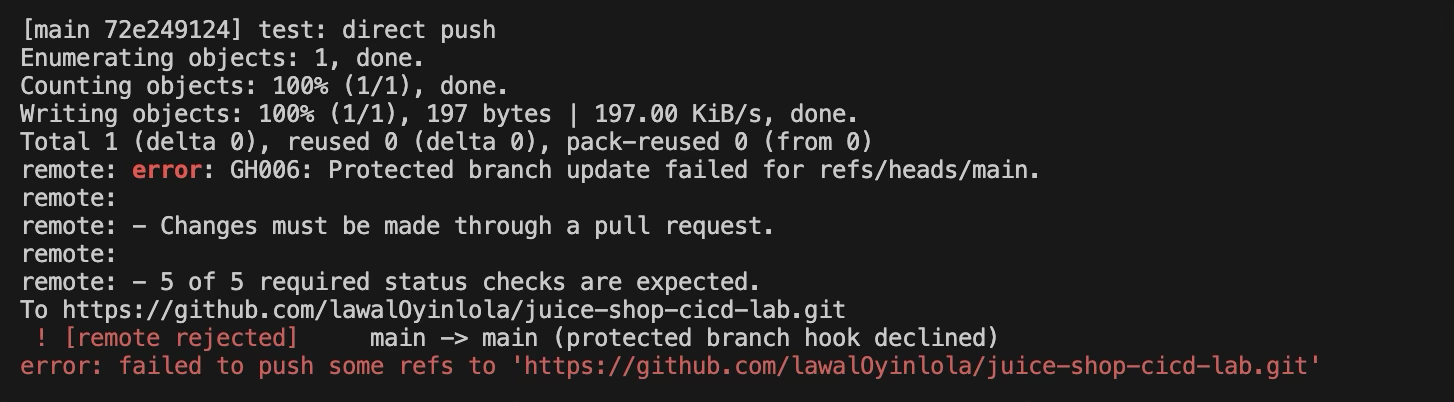
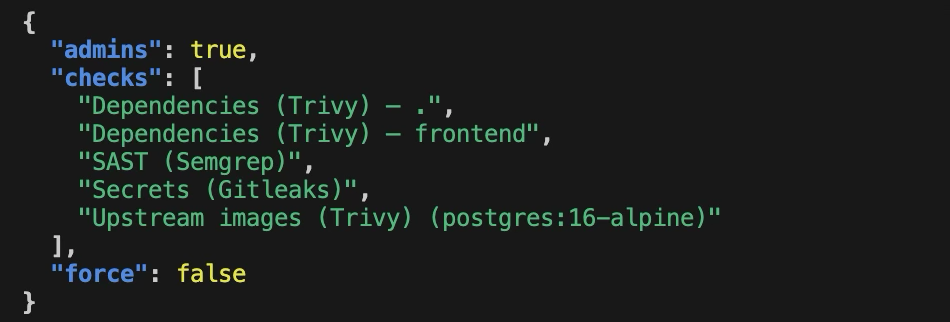
The protection is what you think it is. Read it back from the API rather than trusting the settings page:
gh api repos/OWNER/REPO/branches/main/protection \
  --jq '{checks: .required_status_checks.contexts, admins: .enforce_admins.enabled, force: .allow_force_pushes.enabled}'
A 404 means the branch has no protection at all. Check that every name in checks matches a job that actually runs.
Tick each box once you have captured that shot; it syncs with the screenshot checklist automatically.
What it found on a production app#
I built this on a self-hosted SaaS product with a NestJS backend and a Next.js frontend, which handles location data on real people. These are the numbers from that app, baseline to the end of triage:
| Category | Before | After |
|---|---|---|
| Static analysis findings | 8 | 1 (documented false positive) |
| Dependency vulnerabilities, production scope | 104 | 0 |
| Dependency vulnerabilities, including build tooling | 125 | 4 (accepted, dev-only) |
| Upstream container image vulnerabilities | 184 | 122 |
| Of which critical | 3 | 1 (accepted, documented) |
| Secrets across full git history | 15 | 0 |
The upstream image row is the one that did not go to zero, and it should not be expected to: those images are pulled rather than built, so most of what remains has no published fix to move to. The one critical left is in a helper binary inside the upstream database image, used only to drop privileges when the container starts, with fixed input no attacker controls, before the database accepts a connection. Every available version of the image ships the same component. It is tracked with a review date rather than hidden.
The table is not what I would point a reviewer to, though. The findings that mattered most came from the two things no scanner did: reading the application code, which found the three production bypasses, and treating the pipeline as code under review, which found the fail-open gate in a pipeline I had built myself days earlier. The full case study, in context, action and result form, is in my cybersecurity portfolio on GitHub.
What this does not cover#
This is build-time scanning of code and dependencies. It does not test the running app: there is no dynamic scan here, which is where a tool like OWASP ZAP comes in, and the runtime half of this series is the WAF lab. It does not sign builds or record where they came from. And it does not replace reading the code: the three development shortcuts in module 2 were the most serious findings on that app, and every scanner in this pipeline missed them.
Appendix: troubleshooting#
| Symptom | Cause | Fix |
|---|---|---|
| Trivy reports 0 dependency findings | No lockfile in the scanned folder | Generate one with npm install --package-lock=true --package-lock-only --ignore-scripts and commit it |
| Trivy and Dependabot disagree on the same commit | Trivy leaves dev dependencies out by default | Set TRIVY_INCLUDE_DEV_DEPS: "true" |
Trivy step fails with cannot find ignorefile | security/.trivyignore does not exist | Create it, even with only a comment in it |
trivy image fails with read tcp ... operation timed out | A layer download from the registry stalled on a slow connection | Run the command again, adding --timeout 15m if it keeps happening |
| The image job errors before it scans anything | security/images.txt lists no images, so the matrix is empty | List at least one image, or delete both image jobs and take images out of the report job's needs |
| SAST gate passes despite serious findings | Rules reporting HIGH or CRITICAL instead of ERROR | Count all three in the gate, as in module 4 |
setup-python fails on cache: pip | The cache needs a requirements.txt or pyproject.toml to hash | Remove the cache input |
| The Gitleaks action asks for a licence key | Organisation-owned repository | Download the release binary and verify its checksum, as in module 4 |
Gitleaks install fails at sha256sum -c | Version bumped without updating the checksum | Copy the new checksum from the release's checksums file |
SARIF upload fails with 403 Advanced Security must be enabled | Private repository without GitHub Advanced Security | Report through job summaries and the pull request comment |
| The pull request comment never appears on a fork's pull request | Workflows triggered from forks get a read-only token | Expected; read the job summaries instead |
| Every pull request waits on a check that never arrives | A required check name that no job reports | Let the workflow run once, then copy the exact names from the check-runs API |
| Every pull request waits after you change an upstream image tag | The image job's check name includes the tag, so the required name no longer exists | Update the required check list to the new name, as in module 7 |
gh run cancel says Cannot cancel a workflow run that is completed | The scan finished before the cancel arrived, often because the network stalled | Push another empty commit and cancel sooner, or press Cancel workflow on the Actions tab within the first minute |
Branch protection fails with Upgrade to GitHub Pro or make this repository public | Private repository on GitHub Free | Upgrade, or practise on a public repository |
Deploy gate fails at once with Not Found (HTTP 404) | The workflow file is not called security.yml | Match the file name in the API path to yours |
| A scan on main shows as cancelled | cancel-in-progress true on main, or a pending run replaced by a newer one | The gate refuses that deploy. Re-run the scan, then the deploy |
Appendix: Screenshot checklist#
Capture these as you go. The pull request comment (cicd-5) and the before and after pair from the deploy gate (cicd-9, cicd-10) are the portfolio artifacts; the rest make the write-up evidence rather than assertion. Filenames follow cicd-<n> so a sorted folder reads in lab order.
| Screenshot ID | What it shows | Status |
|---|---|---|
cicd-1 | The lockfile search, one lockfile per shipping project | |
cicd-2 | Baseline counts from Semgrep, Trivy and Gitleaks | |
cicd-3 | SECURITY_PIPELINE_POLICY.md with its triage log | |
cicd-4 | The workflow run: five scan jobs and the report job | |
cicd-5 | The security comment on the pull request | |
cicd-6 | A job summary with dependency findings grouped by package | |
cicd-7 | .trivyignore with a reasoned, dated acceptance | |
cicd-8 | A fully green security run on main | |
cicd-9 | Before the fix: cancelled scan, deploy went ahead on the same commit | |
cicd-10 | After the fix: the deploy refusing the cancelled scan | |
cicd-11 | After the fix: a clean commit scanned and deployed | |
cicd-12 | The fake key blocking a pull request | |
cicd-13 | A direct push to main rejected | |
cicd-14 | Branch protection read back from the API |
Lab status#
The pipeline was built, and every finding triaged, on the real product, with the deploy gate fixed on both sides. The walkthrough has since been run end to end on a stand-in repository, a fork of OWASP Juice Shop, and the screenshots come from that run. The pipeline, the broken gate, the fix and the branch protection all behaved as described here.
Where this sits#
This is the first lab in the AppSec series, and the build-time half of it: the pipeline checks what goes into the product before it ships.
- Runtime defence with a WAF (planned): the same app defended at runtime with ModSecurity and the OWASP Core Rule Set, attacked and measured. Until that lab is up, the results are in the post What my WAF actually blocked.
- AI app security (planned): the same discipline applied to an AI feature, with prompt-injection tests that run in this pipeline.
See how the series connect on the interactive labs map.