The WAF Lab: ModSecurity and the Core Rule Set, Measured Against a Control
Put ModSecurity and the OWASP Core Rule Set in front of a deliberately vulnerable app, run 20 attacks and 9 legitimate requests through it with the rule engine off, watching and blocking, then tune it, raise the paranoia level, write a virtual patch, and find the attacks no rule can see.
- Platform
- Self-hosted
- Target
- OWASP Juice Shop
- Difficulty
- Medium
- OS
- Web
- ModSecurity
- OWASP CRS
- NGINX
- Docker
- Juice Shop
- Python
- curl
- jq
- waf-tuning
- owasp-crs
- false-positive-analysis
- virtual-patching
- detection-engineering
- defence-in-depth
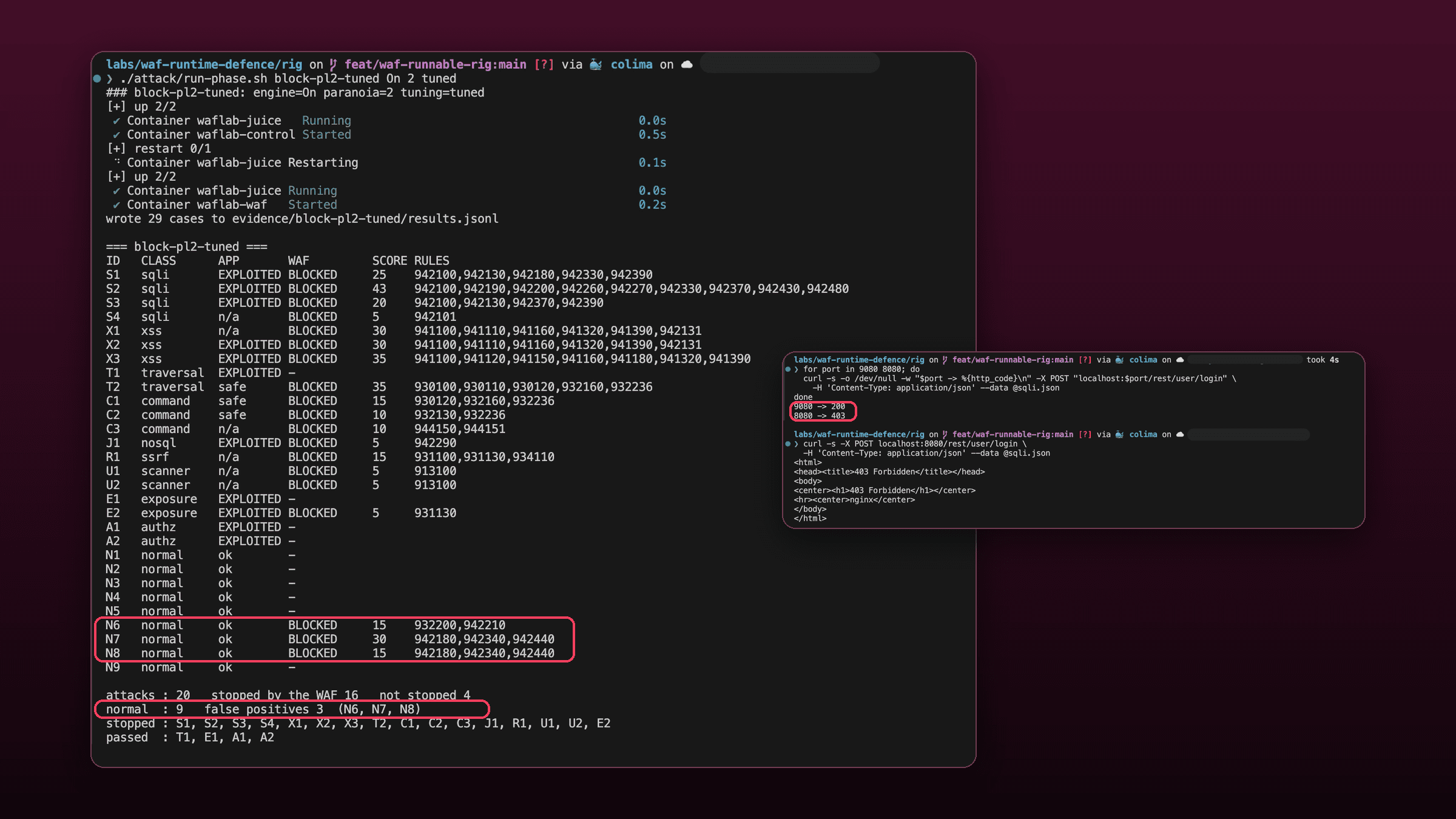
This lab puts a web application firewall in front of an app and measures what it does, instead of assuming. You run the same 29 requests through two identical proxies, one with the rule engine off and one with it on, so every block is a difference between two observations. You watch the firewall without letting it block, turn blocking on and see what it breaks, tune it one rule at a time, raise its sensitivity and count the cost, write a virtual patch for a hole it cannot see, and finish by turning the whole policy into a test that fails when the configuration drifts.
I first built this rig against a production app and wrote the results up in What my WAF actually blocked. A rig that targets a private product cannot be followed by anyone else, so this is the same method rebuilt on OWASP Juice Shop, which you can run yourself. The numbers here are from running this lab, not from that app. Where the two disagree, that is in the lab on purpose.
Attack only what you own. Juice Shop is deliberately vulnerable. Nothing in this lab publishes it beyond your own machine: the target has no published port, and both proxies bind to
127.0.0.1. Keep it that way, and do not point these payloads at anything you do not control.
Module 0: What you need (expand before you start)
Docker with Compose v2. Anything that runs Linux containers: Docker Desktop, Colima, OrbStack, or Docker Engine on Linux. The lab was run on Apple Silicon with Colima. Allow about 2 GB of free memory and 1 GB of disk for the three images.
Your project folder must be somewhere Docker can share. On macOS, keep it inside your home folder. A folder Docker's VM cannot see turns the single-file mounts in the compose file into empty directories, and the WAF container then exits at start-up with input in flex scanner failed. The troubleshooting appendix has the symptom.
Local tools:
python3 --version   # 3.9 or newer; the suite uses only the standard library
curl --version
jq --version        # brew install jq, or apt install jq
docker compose version
Ports 8080 and 9080 free on your machine. Change the published ports in compose.yml if they are not.
Get the lab files. Everything in this guide is in one folder of my cybersecurity portfolio, next to the write-up of the production run:
git clone https://github.com/lawalOyinlola/cybersecurity-portfolio.git
cd cybersecurity-portfolio/labs/waf-runtime-defence/rig
Every command below is run from that folder.
What you are building#
Three containers on one private network. Juice Shop is the target, reachable only through the two proxies. waf is NGINX with ModSecurity and the OWASP Core Rule Set, with the rule engine set by the phase you are running. control is the same image with the same configuration and the rule engine off.
The control is the reason any of this counts as a measurement. Both proxies add the same hop and the same body handling, so when a request succeeds on port 9080 and is blocked on 8080, the only thing that changed is the rule engine. Without it, a block is a claim. With it, a block is a difference.
Three ideas carry the rest of the lab.
The engine has three modes. Off does nothing. DetectionOnly evaluates every rule and logs what it would have done, but lets everything through. On blocks. Real rollouts go DetectionOnly first, for exactly the reason module 4 shows.
The Core Rule Set scores instead of blocking on the first match. Every rule that matches adds points to the request: 5 for a critical rule, 4 for an error, 3 for a warning, 2 for a notice. At the end of the request, if the total reaches the threshold, which is 5 by default, a single rule (949110, "Inbound Anomaly Score Exceeded") blocks it. One critical match is enough. Several small ones can add up to the same result.
The paranoia level decides which rules take part. Level 1 is the conservative default. Level 2 adds more rules, which catch more and also match more legitimate traffic. Levels 3 and 4 go further still. This lab measures levels 1 and 2.
| Phase | Engine | Paranoia | Tuning | What it answers |
|---|---|---|---|---|
baseline | Off | n/a | none | What does the app do with each request on its own? |
detect-pl1 | DetectionOnly | 1 | none | What would the rules do, and to whom? |
block-pl1-untuned | On | 1 | none | What does that break? |
block-pl1-excl1 | On | 1 | method exclusion | Is that the only thing it breaks? |
block-pl1-tuned | On | 1 | two exclusions | Can it block without breaking anything? |
block-pl2-tuned | On | 2 | two exclusions | What does more sensitivity buy? |
block-pl2-tuned-more | On | 2 | four exclusions | And what does it cost to use? |
block-pl1-patched | On | 1 | two exclusions and a virtual patch | What can I close that no generic rule can? |
1. Bring up the rig#
docker compose up -d
docker compose ps
You should see three containers: waflab-juice, waflab-control and waflab-waf. The two proxies publish only on 127.0.0.1; Juice Shop publishes nothing. Give Juice Shop about ten seconds to start, then check both listeners reach it:
curl -s -o /dev/null -w "waf     %{http_code}\n" localhost:8080/
curl -s -o /dev/null -w "control %{http_code}\n" localhost:9080/
Both should print 200. Open http://localhost:8080 in a browser to see the shop. This is the app you are about to attack and defend.
Four choices in compose.yml are worth knowing before you change anything.
- Images are pinned to exact versions:
bkimminich/juice-shop:v20.3.0andowasp/modsecurity-crs:4.30.0-nginx-202610051210(CRS 4.30.0, ModSecurity 3.0.17 on NGINX 1.30.5). A tag likelatestwould let the rule set change under your numbers. - Request bodies are inspected (
MODSEC_REQ_BODY_ACCESS: "on"). Most of Juice Shop's traffic is JSON, and without body inspection the firewall would see none of it. BLOCKING_PARANOIAis set to the same value asPARANOIA. The image has two separate settings, one for the level at which rules are evaluated and one for the level at which they block. Raising only the first gives you a firewall that logs level-2 matches and never acts on them.- The audit log is JSON in
logs/waf/audit.log. Results are parsed from evidence, not tallied by eye.
Checkpoint: three containers running, and both ports answer 200.
Tick each box once you have captured that shot; it syncs with the screenshot checklist automatically.
2. Attack it by hand, then take a baseline#
Before running a suite, send one attack yourself, so the suite is not a black box. This is a SQL injection against the login form. Put the body in a file, to keep the quotes out of the shell:
cat > sqli.json <<'EOF'
{"email": "' OR 1=1--", "password": "x"}
EOF

curl -s -X POST localhost:9080/rest/user/login \
  -H 'Content-Type: application/json' --data @sqli.json | cut -c1-90
The answer starts {"authentication":{"token":"eyJ0eXAi.... That is a session token for the first account in the database, the administrator, handed to someone who typed a quote and a comment marker where an email address belongs. No password was needed. This is what "the attack worked" means in this lab: not that the request was accepted, but that the response proves the app did what the attacker wanted.
The suite#
attack/suite.py sends 29 requests, each one to both ports, and records what each port answered. It uses only the standard library and writes every request target exactly as typed, so an encoded %2500 stays encoded.
| ID | Class | Request | It worked if |
|---|---|---|---|
| S1 | SQL injection | Login bypass in a JSON body | the response holds a session token |
| S2 | SQL injection | UNION SELECT through the search query | the response lists the admin's email |
| S3 | SQL injection | A tautology through the search query | the response lists products that do not match |
| S4 | SQL injection | A tautology in a URL path segment | (no observable effect) |
| X1 | XSS | <script> in a search query | (no observable effect) |
| X2 | XSS | <script> stored in a review | the review is saved |
| X3 | XSS | An onerror handler stored in a review | the review is saved |
| T1 | Traversal | /ftp/eastere.gg%2500.md, a null byte past the file-type check | the file is returned |
| T2 | Traversal | ../../../../etc/passwd in a query | root: in the response |
| C1 | Command | ;cat /etc/passwd in a query | root: in the response |
| C2 | Command | $(id) in a query | uid= in the response |
| C3 | Command | A Log4Shell lookup in a header | (no observable effect) |
| J1 | NoSQL | {"$ne": -1} in a JSON body, rewriting every review | the response counts modified reviews |
| R1 | SSRF | The cloud metadata address as an image URL | (no observable effect) |
| U1 | Scanner | sqlmap user agent | (no observable effect) |
| U2 | Scanner | Nikto user agent | (no observable effect) |
| E1 | Exposure | /encryptionkeys/jwt.pub | the key is returned |
| E2 | Exposure | An open redirect to an outside host | the redirect points outside |
| A1 | Authorisation | Read another user's basket by changing its ID | the basket belongs to user 1 |
| A2 | Authorisation | Register with "role": "admin" | the new account is an admin |
| N1 to N9 | Legitimate | Search, add, change and remove a basket item, post a review with an ampersand and apostrophe, register and log in with a strong password, download a public file | the app answers normally |
The "worked if" column is the whole point. Several attacks have no observable effect on this app, which is stated, not hidden: a request can be an obvious attack and still do nothing, and the firewall's job is to read the request, not the app's reaction.
Run the baseline. run-phase.sh takes a phase label, the engine, the paranoia level and a tuning file. It restarts Juice Shop so every phase begins from the same data, installs the tuning file, starts the WAF fresh, runs the suite and prints a summary:
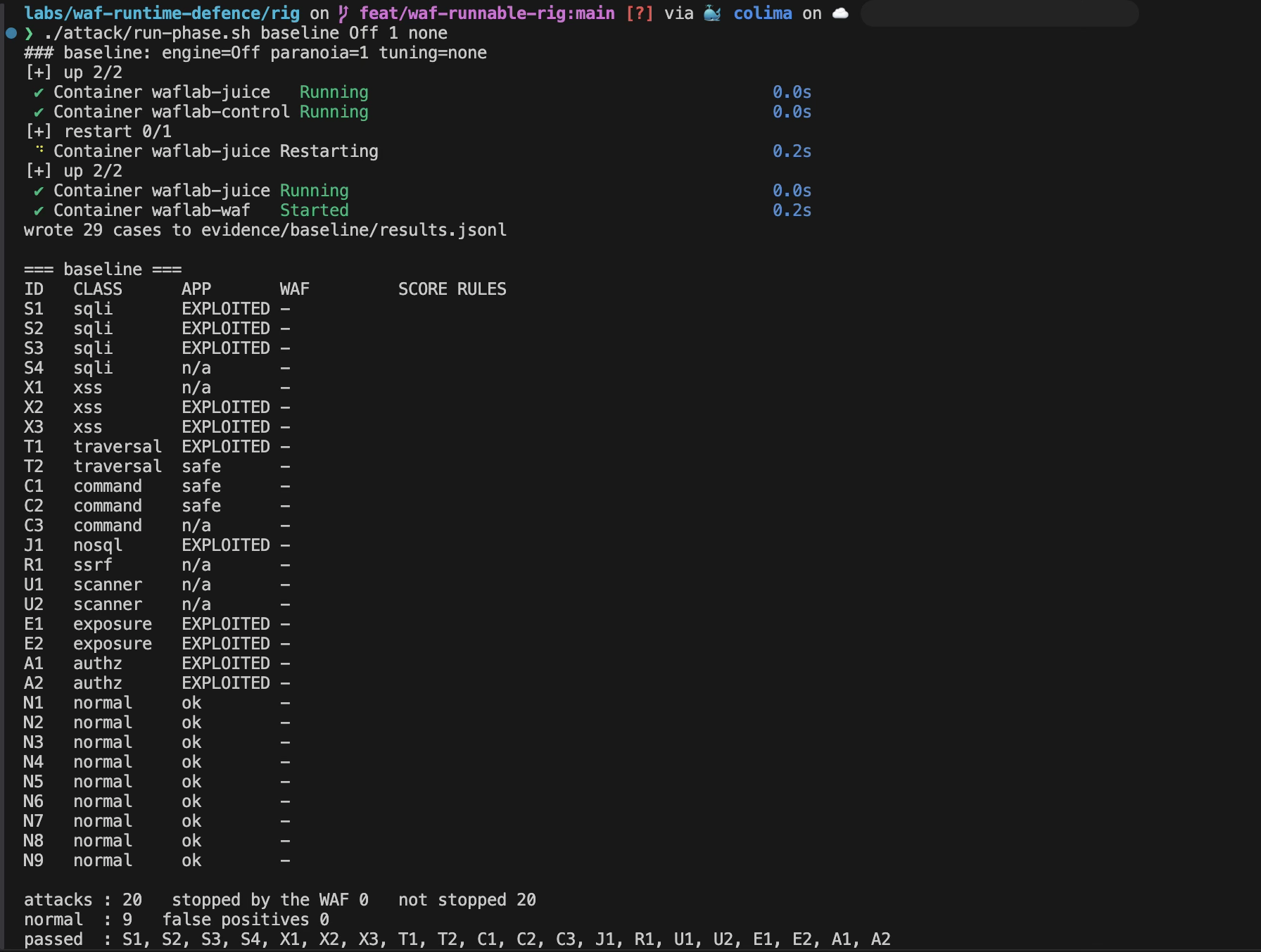
./attack/run-phase.sh baseline Off 1 noneThe table has one row per case. In the APP column, EXPLOITED means the attack worked against the app, safe means the app dealt with it, n/a means nothing observable could prove either way, and ok is a legitimate request answered normally. The WAF column is empty because the engine is off. The footer counts all twenty attacks as not stopped for the same reason: nothing is in the way. Only the APP column says which of them mattered.
Eleven of the twenty attacks worked: S1, S2, S3, X2, X3, T1, J1, E1, E2, A1 and A2. Three did nothing to the app (T2, C1, C2). Six have no observable effect (S4, X1, C3, R1, U1, U2). All nine legitimate requests were answered normally.
That split is the lens for the rest of the lab. A firewall that stops the eleven is protecting you. One that stops only the nine that were harmless anyway is a pretty dashboard.
Checkpoint: the baseline reports 11 EXPLOITED, 3 safe, 6 n/a, and 9 ok.
Tick each box once you have captured that shot; it syncs with the screenshot checklist automatically.
3. Watch without blocking#
Now switch the rules on in DetectionOnly. Nothing is blocked, so every response is the same as the baseline. What changes is the audit log, which records what the firewall would have done:
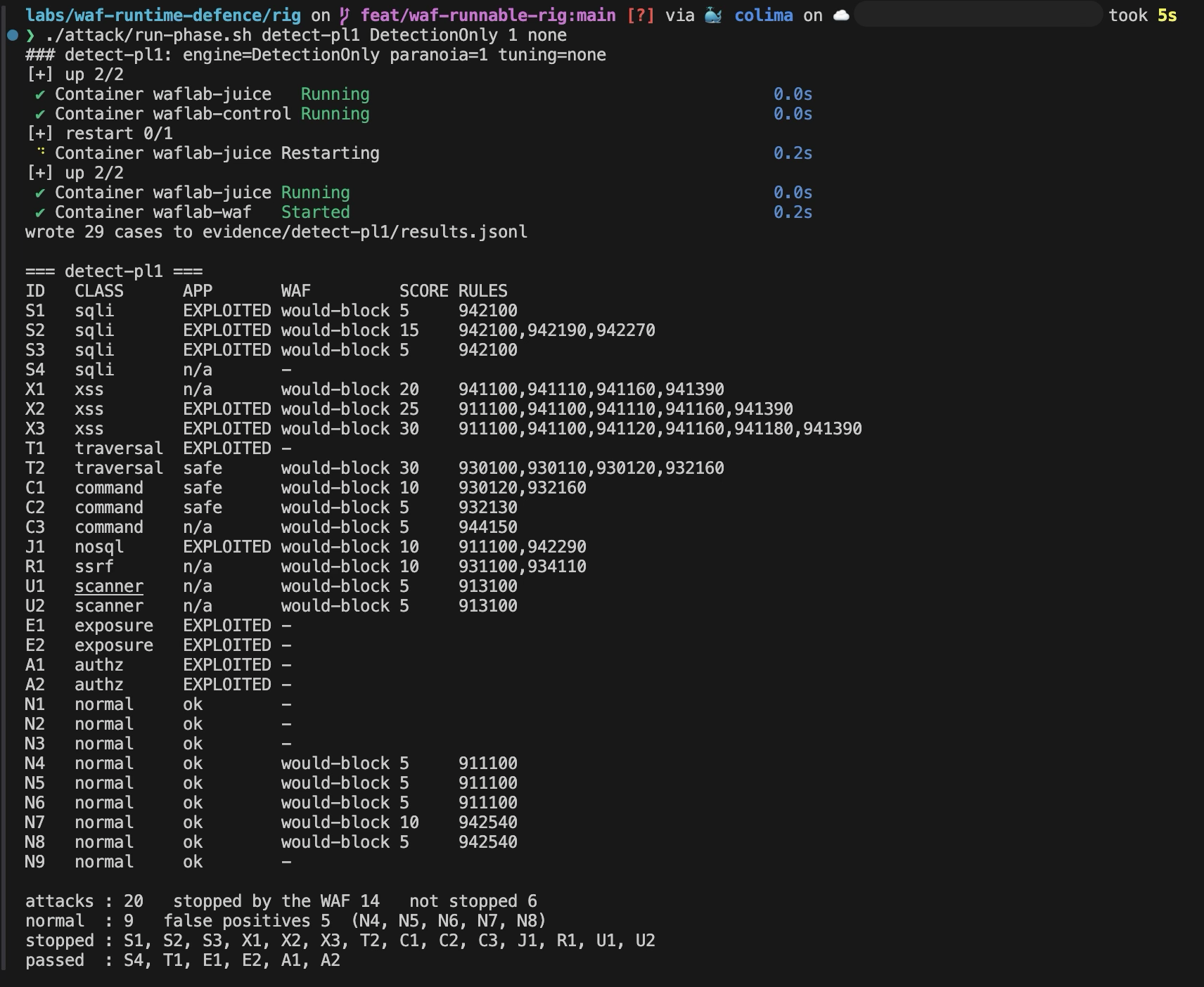
./attack/run-phase.sh detect-pl1 DetectionOnly 1 noneWAF now reads would-block for any request whose anomaly score reached the threshold, with the score and the rules that contributed. Of the twenty attacks, fourteen would be blocked: S1, S2, S3, X1, X2, X3, T2, C1, C2, C3, J1, R1, U1 and U2. Six pass: S4, T1, E1, E2, A1 and A2.
The footer of the table still says stopped by the WAF 14 for this phase, because it counts what the rules matched. In DetectionOnly read it as "would have been stopped": nothing was blocked, and every response matches the baseline.
Read the other half first, because it is the half that decides whether you can ever turn blocking on. Of the nine legitimate requests, five would be blocked: N4, N5, N6, N7 and N8. The firewall has flagged a customer changing the quantity of something in their basket.
Read the evidence#
The summary is built from the audit log. Read the raw entries to see why. Every request carries an X-Case-Id header, so you can pull out any one. This is the UNION SELECT attack:
jq -r 'select(.transaction.request.headers["X-Case-Id"]=="S2")
  | .transaction.messages[] | "\(.details.ruleId)\t\(.message)"' \
  evidence/detect-pl1/audit.json
942100 SQL Injection Attack Detected via libinjection
942190 Detects SQL code execution and information gathering attempts
942270 Looking for basic sql injection. Common attack string for mysql, oracle and others
949110 Inbound Anomaly Score Exceeded (Total Score: 15)Three critical rules at 5 points each make 15, and 949110 is the one that would block. Now the legitimate request that was flagged, N4, a customer changing a basket quantity:
jq -r 'select(.transaction.request.headers["X-Case-Id"]=="N4")
  | "\(.transaction.request.method) \(.transaction.request.uri) -> \(.transaction.response.http_code)",
    (.transaction.messages[] | "  \(.details.ruleId) \(.message)")' \
  evidence/detect-pl1/audit.json
PUT /api/BasketItems/10 -> 200
911100 Method is not allowed by policy
949110 Inbound Anomaly Score Exceeded (Total Score: 5)The app answered 200, because nothing was blocked. The firewall's complaint is not about the content at all. It is about the verb: PUT. The Core Rule Set allows GET, HEAD, POST and OPTIONS and scores everything else, and a REST app uses the others constantly. The item ID will differ in your run.
One more log fact, worth checking now because it matters in module 7:
jq -c 'select(.transaction.request.headers["X-Case-Id"]=="A1")' \
  evidence/detect-pl1/audit.json | wc -l
It prints 0. The attack that read another customer's basket left no trace in the firewall's log at all.
Checkpoint: fourteen attacks would-block, five legitimate requests flagged (N4 to N8), and nothing in the log for A1.
Tick each box once you have captured that shot; it syncs with the screenshot checklist automatically.
4. Turn blocking on and break the app#
Switch the engine to On, with nothing tuned:
./attack/run-phase.sh block-pl1-untuned On 1 noneThe same fourteen attacks are now BLOCKED, and so are the same five legitimate requests. Send the login bypass from module 2 to both ports:
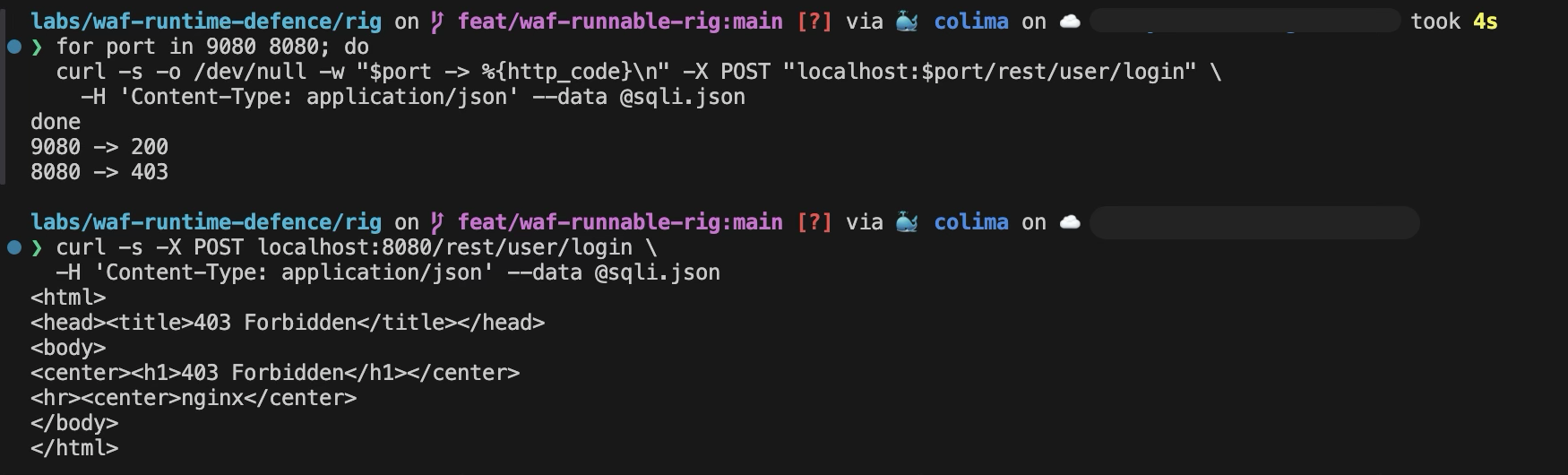
for port in 9080 8080; do
  curl -s -o /dev/null -w "$port -> %{http_code}\n" -X POST "localhost:$port/rest/user/login" \
    -H 'Content-Type: application/json' --data @sqli.json
done
9080 -> 200
8080 -> 403Identical request, identical path, different answer. That is the whole lab in two lines. Look at what the visitor on 8080 gets:
curl -s -X POST localhost:8080/rest/user/login \
  -H 'Content-Type: application/json' --data @sqli.json
A bare NGINX 403 Forbidden page. It says nothing about why, which is correct for an attacker and unhelpful for a customer, a point you will care about when you tune.
What it broke#
Five legitimate requests fail for two reasons.
- N4, N5 and N6 are blocked by rule
911100, the method check: aPUTto change a basket quantity, aDELETEto remove an item, and aPUTto post a review. A customer changing a basket quantity sends exactly that request. - N7 and N8 are a registration and a login with a strong password,
P@ss'w0rd!";--, blocked by rule942540, which looks for SQL authentication bypass. The password contains a quote, a semicolon and two hyphens, which is exactly what a strong password with symbols looks like. Anyone whose password manager generates symbols is locked out of this shop.
Try it in the browser: open http://localhost:8080, register with that password, and watch the Network tab in the developer tools. The registration form posts to the same endpoint as case N7, so expect the same answer, a 403.
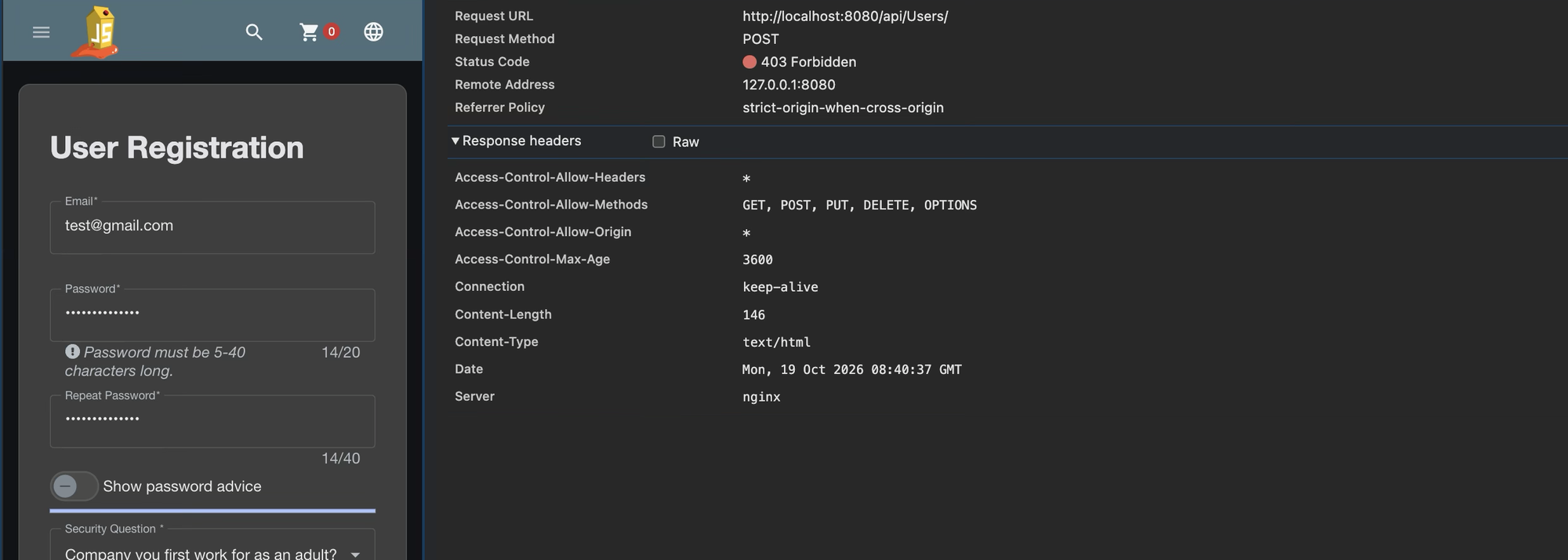
The same Network tab will also show a column of red socket.io requests. They are blocked too, by rule 920420, which rejects request content types the policy does not list, and Juice Shop's polling requests are text/plain. It is a real false positive, but the channel only announces solved challenges, no customer needs it, and the suite has no case for it, so the lab leaves it alone. On a site where it mattered, it is the kind of block that stays invisible until someone opens the log.
This is why module 3 exists. Had you gone straight to blocking on a live site, this is what your customers would have found first.
Checkpoint: the attack returns 200 on 9080 and 403 on 8080, and the summary reports five false positives.
Tick each box once you have captured that shot; it syncs with the screenshot checklist automatically.
5. Tune it, one rule at a time#
There are two ways to stop a false positive. One is to lower the paranoia level, or raise the score threshold. The other is to tell the firewall that one specific rule should not apply to one specific part of one specific request. The first is a blunt dial: it fixes the same false positive and silently gives up real detection everywhere else, and you never learn which. Do the second.
Every exclusion goes in waf/modsec/REQUEST-900-EXCLUSION-RULES-BEFORE-CRS.conf, which the CRS loads before its own rules. You do not edit that file directly. The tuning options live in waf/tuning/ and run-phase.sh installs the one you name. Each exclusion carries a comment saying what it unblocks and what it gives up, and you should write yours the same way.
Exclusion 1: let the REST verbs through#
The method rule (911100) is a false positive on every route that updates or deletes. This exclusion allows the full verb set, but only under /api/ and /rest/. It is configuration, not a command, and it is already in waf/tuning/excl-1.conf, so read it here and do not paste it into a terminal:
SecRule REQUEST_URI "@rx ^/(api|rest)/" \
  "id:1000001,\
   phase:1,\
   pass,\
   nolog,\
   t:none,\
   setvar:'tx.allowed_methods=GET HEAD POST OPTIONS PUT PATCH DELETE'"
The CRS only sets its default list when tx.allowed_methods is unset, so setting it in phase 1, before the CRS initialisation runs, makes the CRS leave it alone. The id is in the 1,000,000+ range, clear of the CRS's own 900000 to 999999 space.
What it gives up: the method check on those two prefixes, and nothing else. The rest of the site keeps the strict default.
./attack/run-phase.sh block-pl1-excl1 On 1 excl-1Three of the five are fixed. N7 and N8, the strong password, remain.
Exclusion 2: passwords may contain the characters passwords contain#
Rule 942540 matches the quote, semicolon and comment markers in P@ss'w0rd!";--. Excluding the rule everywhere would blind it to a login form's email field, which is where the real injection in S1 lives. So the exclusion removes the rule from one field at a time, on the two endpoints that accept a password. This one is in waf/tuning/tuned.conf, and like the first it is read, not run:
SecRule REQUEST_URI "@rx ^/(api/Users|rest/user/login)$" \
  "id:1000002,\
   phase:1,\
   pass,\
   nolog,\
   t:none,\
   ctl:ruleRemoveTargetById=942540;ARGS:json.password,\
   ctl:ruleRemoveTargetById=942540;ARGS:json.passwordRepeat"
How do you find those names? From the log. In the untuned run, the match data names the field it matched:
jq -r 'select(.transaction.request.headers["X-Case-Id"]=="N7")
  | .transaction.messages[] | select(.details.ruleId=="942540") | .details.data' \
  evidence/block-pl1-untuned/audit.json | head -2
Matched Data: P@ss'w0rd!"; found within ARGS:json.passwordRepeat: P@ss'w0rd!";--ARGS:json.passwordRepeat is a field in a JSON body, which is how the CRS names it. Install both exclusions:
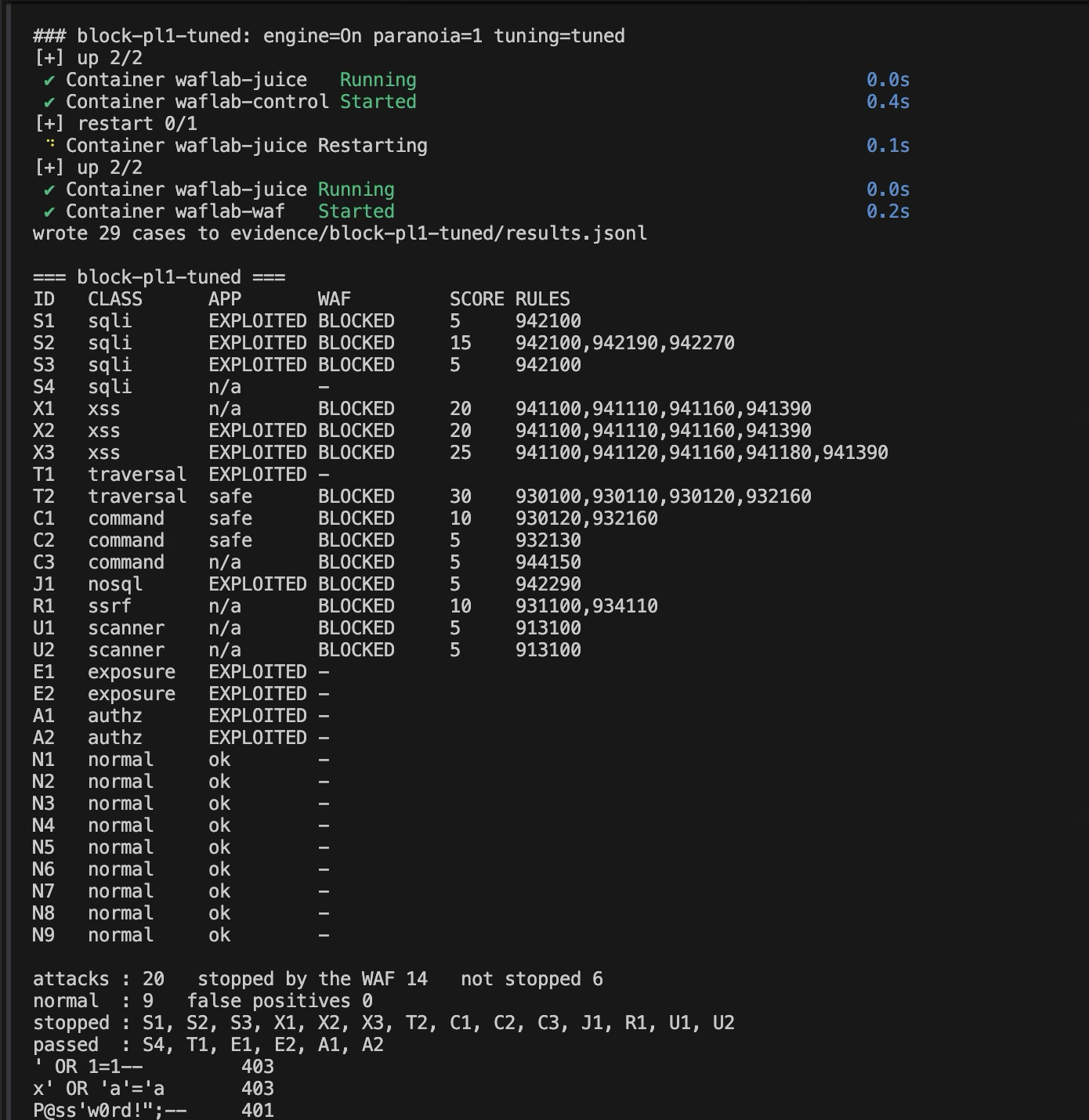
./attack/run-phase.sh block-pl1-tuned On 1 tunedZero false positives, and the same fourteen attacks still stopped. Nothing was traded away in detection to get there.
Check what you gave up#
An exclusion is a hole you have chosen to cut, and a hole needs testing. This one is narrow, but it does mean rule 942540 no longer looks at the password. Prove that a real injection in the password field is still caught, by other rules:
for pw in "' OR 1=1--" "x' OR 'a'='a" $'P@ss\'w0rd!";--'; do
  printf '{"email":"a@b.c","password":%s}' "$(python3 -c 'import json,sys;print(json.dumps(sys.argv[1]))' "$pw")" > pw.json
  printf '%-18s ' "$pw"
  curl -s -o /dev/null -w '%{http_code}\n' -X POST localhost:8080/rest/user/login \
    -H 'Content-Type: application/json' --data @pw.json
done
' OR 1=1-- 403
x' OR 'a'='a 403
P@ss'w0rd!";-- 401The two injections are still blocked, by the libinjection rule 942100, which this exclusion did not touch. The strong password reaches the app, which answers 401 because the credentials are wrong. That is the right outcome for all three.
The strong password is written as $'...' in the loop, not in double quotes, because zsh, the default shell on macOS, expands ! inside double quotes and stops with event not found.
A note on editing the file#
If you change the exclusions file by hand rather than through run-phase.sh, recreate the container afterwards:
docker compose up -d --force-recreate wafThe file is mounted into the container on its own. If your editor, or sed -i, replaces the file instead of writing into it, the running container keeps looking at the old one and, in practice, stops being able to find it at all. A restart or recreate picks the new file up. run-phase.sh writes in place and recreates every time, for exactly this reason.
Checkpoint: block-pl1-tuned reports 14 attacks stopped and 0 false positives, and the password check above prints 403, 403, 401.
Tick each box once you have captured that shot; it syncs with the screenshot checklist automatically.
6. Raise the paranoia level and count the cost#
Level 2 adds rules. Run it on the same tuning:
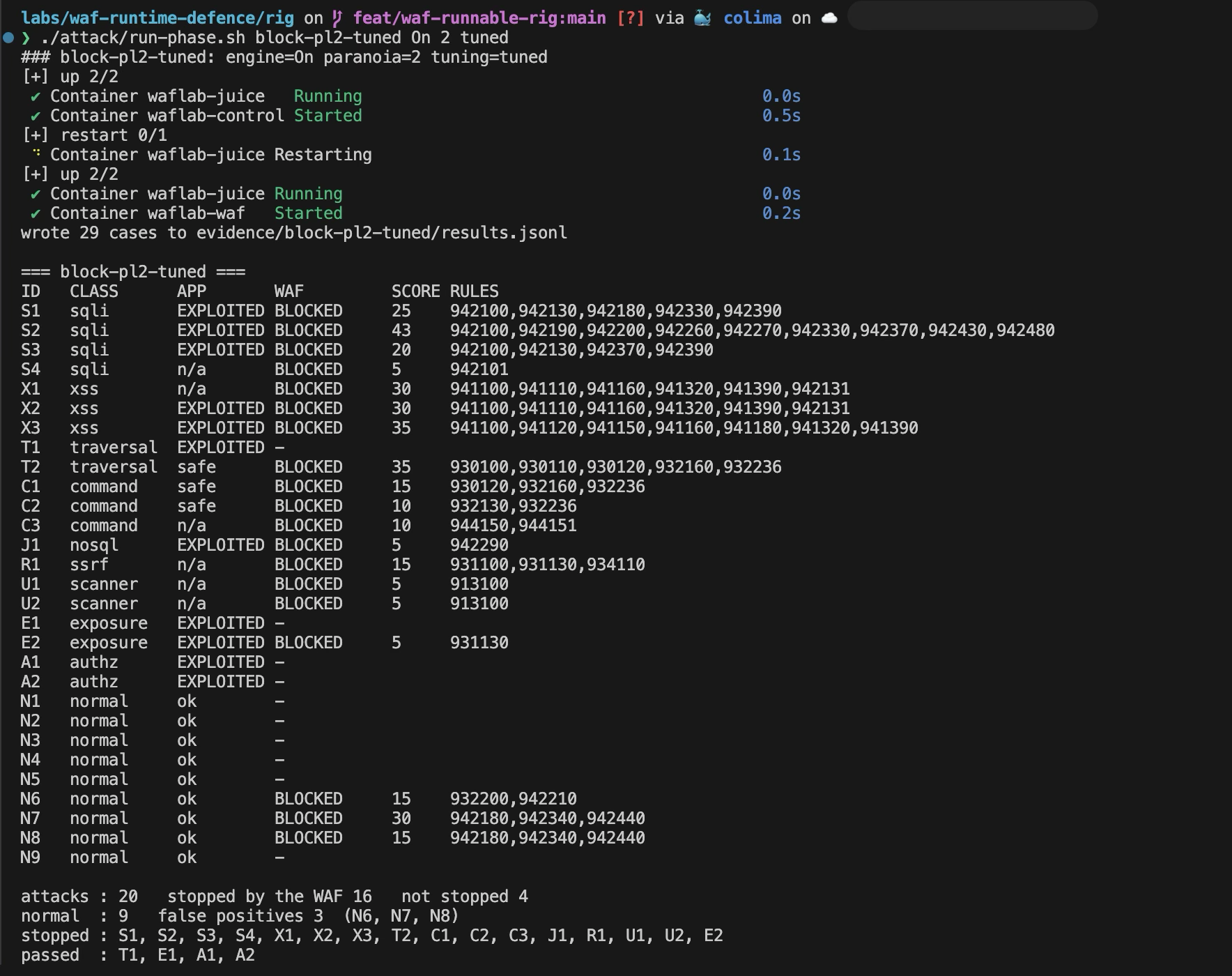
./attack/run-phase.sh block-pl2-tuned On 2 tunedTwo more attacks are stopped, and three legitimate requests are blocked.
The two new blocks:
- S4, the injection in a URL path, is caught by rule
942101(SQL injection by libinjection, on the path itself). Level 1's injection rules read arguments, not the path, so a payload in a path segment walked straight past. Level 2 reads the path. On this app, S4 has no effect either way, so what you have bought is coverage for an app whose paths are vulnerable, which this one's are not. - E2, the open redirect, is caught by rule
931130, which blocks a parameter containing a link to another host. That stopped a real attack: E2 worked at the baseline. It will also stop any legitimate request that carries a URL in a parameter, which is a reasonable thing for an app to want.
The three new false positives:
| Case | What it was | Rules |
|---|---|---|
| N6 | A review: "Love it! A&B Juice, it's 5/5 and 100% worth it." | 932200 (RCE bypass technique), 942210 (chained SQL injection) |
| N7 | Registering with the strong password | 942180, 942340, 942440 |
| N8 | Logging in with it | the same three |
Level 2 reads ordinary English with an ampersand and an apostrophe as an attack. And the password you excluded from one rule at level 1 now matches three more, one of which is the comment sequence ";-- itself.
The price of using level 2#
You can run level 2 if you pay for it. Two more exclusions, written the same way and already in waf/tuning/tuned-pl2.conf:
SecRule REQUEST_URI "@rx ^/(api/Users|rest/user/login)$" \
  "id:1000003, phase:1, pass, nolog, t:none,\
   ctl:ruleRemoveTargetById=942180;ARGS:json.password,\
   ctl:ruleRemoveTargetById=942180;ARGS:json.passwordRepeat,\
   ctl:ruleRemoveTargetById=942340;ARGS:json.password,\
   ctl:ruleRemoveTargetById=942340;ARGS:json.passwordRepeat,\
   ctl:ruleRemoveTargetById=942440;ARGS:json.password,\
   ctl:ruleRemoveTargetById=942440;ARGS:json.passwordRepeat"

SecRule REQUEST_URI "@rx ^/rest/products/[0-9]+/reviews$" \
  "id:1000004, phase:1, pass, nolog, t:none,\
   ctl:ruleRemoveTargetById=932200;ARGS:json.message,\
   ctl:ruleRemoveTargetById=942210;ARGS:json.message"
./attack/run-phase.sh block-pl2-tuned-more On 2 tuned-pl2Sixteen attacks stopped, zero false positives. Here is the comparison that decides which to run:
| Level 1, tuned | Level 2, two exclusions | Level 2, four exclusions | |
|---|---|---|---|
| Attacks stopped, of 20 | 14 | 16 | 16 |
| Of the 11 that worked, stopped | 6 | 7 | 7 |
| Legitimate requests blocked, of 9 | 0 | 3 | 0 |
| Exclusions to maintain | 2 | 2 | 4 |
| Rule and field pairs the firewall no longer reads | 2 | 2 | 10 |
The honest reading is that level 2 bought one real block (E2) and one harmless one (S4), and cost eight more rule and field pairs that no longer inspect the password and review fields. Two caveats make that worse for level 2, not better. First, nine scripted requests are not traffic. Zero false positives on nine requests says nothing about what real customers type. Before enabling a higher level on anything real, replay a real log through DetectionOnly and read what it flags. Second, the redirect that level 2 stops is not fixed, only fenced: the code that issues the redirect is still broken.
My choice for this app is level 1, tuned, with the redirect fixed in code and the null-byte hole closed by the patch in module 7. Your app's answer may differ, and now you have a way to find it.
Checkpoint: block-pl2-tuned reports 16 attacks stopped and 3 false positives (N6, N7, N8); block-pl2-tuned-more reports 16 and 0.
Tick each box once you have captured that shot; it syncs with the screenshot checklist automatically.
7. What no rule can see, and a virtual patch for what it can#
Return to the phases that tuned level 1 left behind. Six attacks passed (S4, T1, E1, E2, A1 and A2), and they are not the same kind of failure.
Three the firewall will never see#
A1, reading another customer's basket. The request is GET /rest/basket/1 with a valid session for user 26. Look at it from the firewall's side: a logged-in customer asking for a basket by number. It is byte for byte the shape of asking for their own. There is no pattern to match, because the attack is a fact about who owns row 1, and that fact lives in a database the firewall cannot read. The audit log for A1 is empty, as you saw in module 3. Only the application can fix this, by checking that the basket belongs to the person asking.
A2, registering as an administrator. A registration form that accepts "role": "admin" from the client. Well-formed JSON with a field the server should have ignored. The fix is on the server: an allowlist of the fields a user may set.
E1, a signing key sitting in a public folder. A valid request for a file that should never have been served. The firewall has no opinion on what you chose to publish.
These three are the same class, and they are the ones that fill breach reports. They are invisible to this kind of control by construction, not through some gap in the rules.
One it could see, if you tell it#
T1 is different. The request is /ftp/eastere.gg%2500.md. The file server checks that the name ends in .md, then decodes the path, and the decoded name ends in a null byte followed by .md, which the file system reads as eastere.gg. The extension check is defeated by an encoded null byte. No generic rule describes that, so it passed at both levels.
You cannot fix the file server today, but you can describe this exact shape. That is a virtual patch: a rule that blocks a known exploit at the edge while the real fix waits for a release.
SecRule REQUEST_URI_RAW "@rx ^/ftp/[^?]*%(?:25)?00" \
  "id:1000010,\
   phase:1,\
   deny,\
   status:403,\
   log,\
   auditlog,\
   t:none,\
   msg:'Virtual patch VP-1: encoded null byte in a /ftp/ path',\
   tag:'virtual-patch'"
It matches an encoded null byte, single or double encoded, in the path under /ftp/, and nothing else: [^?]* stops at the query string, so a %00 in a parameter is left to the other rules. It denies at once rather than adding to a score, because there is no ambiguity to weigh: no legitimate file name contains a null byte. N9, a download of a public file, is in the suite for exactly this reason: a virtual patch is only as good as the proof that it did not break the normal case.
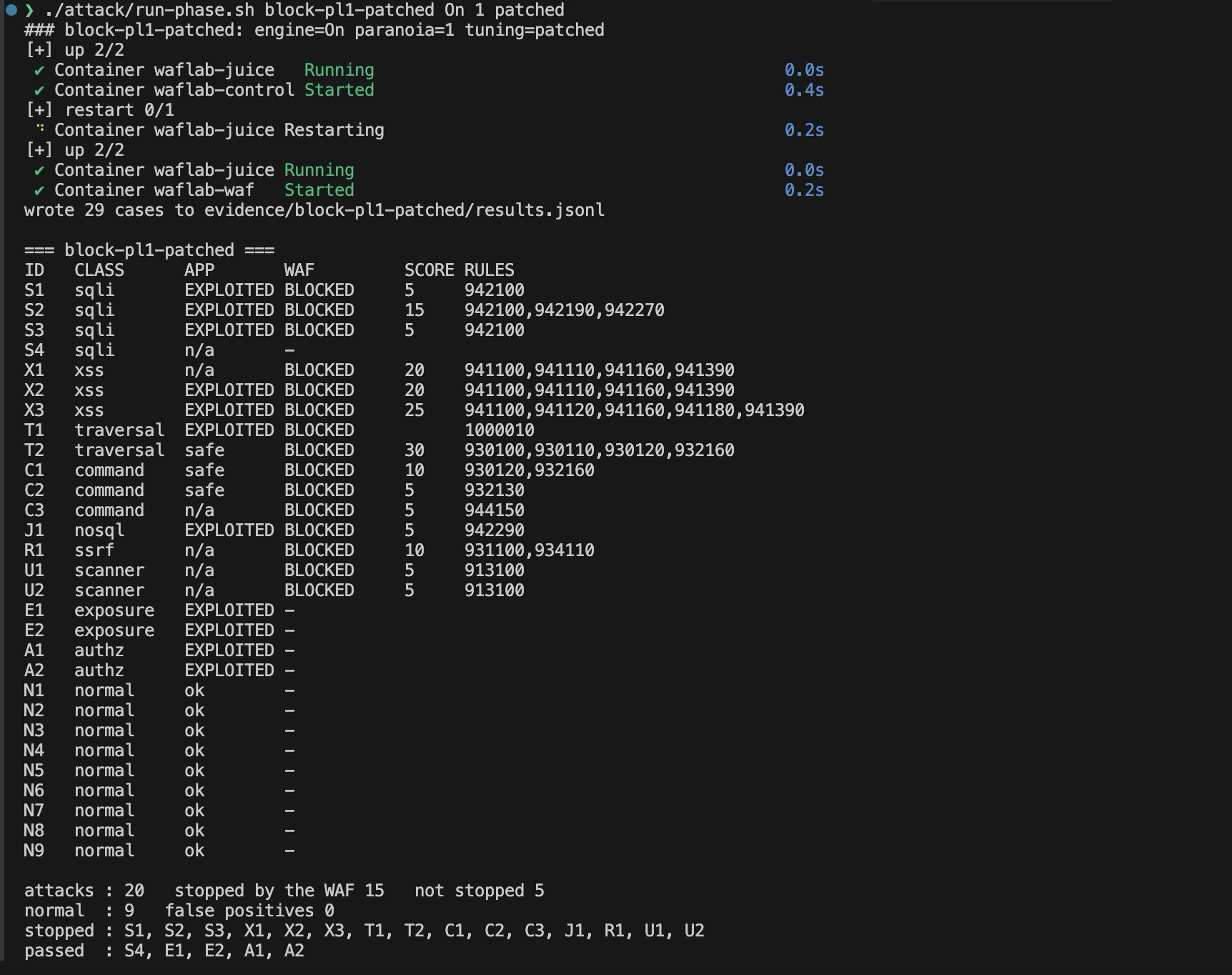
./attack/run-phase.sh block-pl1-patched On 1 patchedT1 is now BLOCKED, N9 still passes, and the totals read 15 attacks stopped and 0 false positives.
A virtual patch buys time and nothing more. It describes the exploit, not the weakness, so a different route to the same weakness can walk around it. The real fix is the one that stops decoding after the check.
Checkpoint: block-pl1-patched reports T1 BLOCKED, N9 ok, 15 stopped, 0 false positives.
Tick each box once you have captured that shot; it syncs with the screenshot checklist automatically.
8. Turn the policy into a test#
Everything so far was read by eye. A WAF configuration is code, so it should fail a check when it drifts. attack/check.py reads a phase's summary and exits non-zero when the policy is broken: here, that fourteen named attacks must be stopped and that no legitimate request may be.
MUST=S1,S2,S3,X1,X2,X3,T2,C1,C2,C3,J1,R1,U1,U2

./attack/check.py block-pl1-untuned --must-stop $MUST --max-false-positives 0
./attack/check.py block-pl1-tuned   --must-stop $MUST --max-false-positives 0
FAIL block-pl1-untuned
- false positives (5, allowed 0): N4, N5, N6, N7, N8
PASS block-pl1-tuned: 14 required attacks stopped, 0 false positives
The first fails with exit code 1 and names the five requests it broke. The second passes. Delete exclusion 2 from waf/tuning/tuned.conf, re-run the phase, and the check fails again for N7 and N8, which is the point: the next person to touch this file finds out in seconds, not from a customer.
The same two commands should run on any CI runner that has Docker, so the policy could gate a change to the rules the way the CI/CD lab gates a change to the code. I have not wired that up here; the check itself is what this lab verifies.
To run every phase in order and keep the evidence:
./attack/run-all.shIt takes under a minute. When you are finished with the rig:
docker compose down -vTick each box once you have captured that shot; it syncs with the screenshot checklist automatically.
Every phase, side by side#
| Phase | Attacks stopped, of 20 | Legitimate blocked, of 9 |
|---|---|---|
baseline (engine off) | 0 | 0 |
detect-pl1 (would block) | 14 | 5 |
block-pl1-untuned | 14 | 5 |
block-pl1-excl1 | 14 | 2 |
block-pl1-tuned | 14 | 0 |
block-pl1-patched | 15 | 0 |
block-pl2-tuned | 16 | 3 |
block-pl2-tuned-more | 16 | 0 |
What it found on a production app#
The first version of this rig ran against a production NestJS and Next.js app, with a synthetic database. There the picture was nearly the opposite, and the writeup is in What my WAF actually blocked: 26 payloads, 12 blocked at tuned level 1, of which five were requests the app already rejected on its own and seven were stopped a step earlier than the app's own downstream defences. Level 2 caught nothing level 1 had missed and added two false positives. A tenant-isolation attack, the same class as A1 here, returned the identical 404 with the firewall on and off.
Run the two side by side and the lesson is the same from opposite directions. On a deliberately broken app, the firewall looks heroic, because there is so much to stop. On a sound one, it mostly agrees with the code it sits in front of. In both, the class that decides real breaches never appeared in the firewall's column. A WAF is a compensating control: it helps most where the application is weakest, and it never takes the place of fixing it.
What this does not cover#
This is one rule set (CRS 4.30.0) on one engine (ModSecurity 3 on NGINX), at paranoia levels 1 and 2. Levels 3 and 4 were not run. It is not an evasion study: the payloads are standard, and a determined attacker would try encodings and tricks that are not in this suite. Nine legitimate requests is not enough traffic to estimate a false positive rate, and Juice Shop is not your app. No cloud WAF was tested, so nothing here transfers automatically to Cloudflare or AWS WAF, whose rules and defaults differ. Rate limiting, bot management and latency overhead were not measured. And a WAF stands in front of the app, not in place of it: every attack the firewall missed here needs a fix in the application.
Appendix: troubleshooting#
| Symptom | Cause | Fix |
|---|---|---|
waflab-waf exits at once; its log ends with input in flex scanner failed | The project folder is outside what Docker shares with its VM, so the exclusions file is mounted as an empty directory | Move the folder into your home directory and bring the rig up again |
docker compose up -d fails with The container name "/waflab-juice" is already in use | Containers from an earlier copy of the lab, started from another folder, still hold the names | Run docker compose down in that folder, or docker rm -f waflab-juice waflab-control waflab-waf, then start again |
zsh: command not found: SecRule | The rule text from module 5 or 6 was pasted into a terminal | It is configuration, not a command. The rules are already in waf/tuning/, and run-phase.sh installs them |
zsh: event not found on a line containing ! inside double quotes | zsh expands ! in double quotes | Use $'...' quoting or single quotes, as the password check does |
run-phase.sh stops with "Nothing answered on port ... after 90 seconds" | A container did not start | docker compose ps -a, then docker compose logs waf |
Every request returns 502 just after starting | Juice Shop is still starting | Wait about ten seconds |
suite.py stops with setup failed on port ... | Juice Shop is not answering, or is still restarting | Wait, then re-run the phase |
bind: address already in use | Something else holds 8080 or 9080 | Change the published ports in compose.yml |
Reading audit.log fails with a parse error | The log was emptied while the WAF still had it open, leaving padding bytes | Run phases through run-phase.sh, which empties it before the container starts, and read evidence/<phase>/audit.json |
The WAF column is - for every attack in a detection phase | The audit log was not copied next to the results | Run the phase through run-phase.sh, not suite.py alone |
| A change to an exclusion has no effect | The file was replaced rather than written into, so the container is looking at the old one | docker compose up -d --force-recreate waf |
check.py cannot find summary.json | summarise.py did not run for that phase | Run it through run-phase.sh |
403 on a legitimate request after tuning | A rule fires on a field you have not excluded | Read the rule and field from the audit log, as in module 5, and exclude that pair |
Appendix: Screenshot checklist#
Capture these as you go. The same attack on both ports (waf-5) and the level 2 false positives (waf-8) are the portfolio artifacts; the rest make the write-up evidence rather than assertion. Filenames follow waf-<n> so a sorted folder reads in lab order.
| Screenshot ID | What it shows | Status |
|---|---|---|
waf-1 | docker compose ps with the three containers up | |
waf-2 | The baseline table, eleven attacks marked EXPLOITED | |
waf-3 | The detection table with the five legitimate requests flagged | |
waf-4 | The jq output for S2 and for N4 | |
waf-5 | The same attack on both ports, 200 against 403 | |
waf-6 | The browser Network tab showing the strong-password registration blocked | |
waf-7 | The tuned level 1 table, fourteen stopped and no false positives | |
waf-8 | The level 2 table with its three false positives | |
waf-9 | The virtual patch phase: T1 blocked by rule 1000010, 15 stopped | |
waf-10 | check.py failing on the untuned run and passing on the tuned one |
Lab status#
The rig was built from a clean copy of the lab folder and run end to end, every phase, on Apple Silicon with Colima. A second run of this guide, from a copy of the published folder, reproduced every number in the tables here, and the screenshots come from that run. It also caught two mistakes in the guide, which are fixed: a password check that zsh refused to run, and a start-up clash with containers left over from an earlier copy of the lab. The browser step in module 4 returned the 403 the guide describes.
Where this sits#
This is the second lab in the AppSec series, the runtime half: the build-time half is the CI/CD lab, which checks what goes into the product before it ships, and this one measures what stands in front of it once it is live.
- AI app security (planned): the same discipline applied to an AI feature, with prompt-injection tests that run in the pipeline.
- The writeup of the first run is the post What my WAF actually blocked.
See how the series connect on the interactive labs map.