Three controls that looked switched on
A deploy gate that checked one commit and shipped another, a secrets scanner that never read a merge commit, and a rate limiter that saw every visitor as the same address. All three passed every check I had. Here is how each one failed quietly, and a two-minute test for each.
- security
- appsec
- devops
- webdev
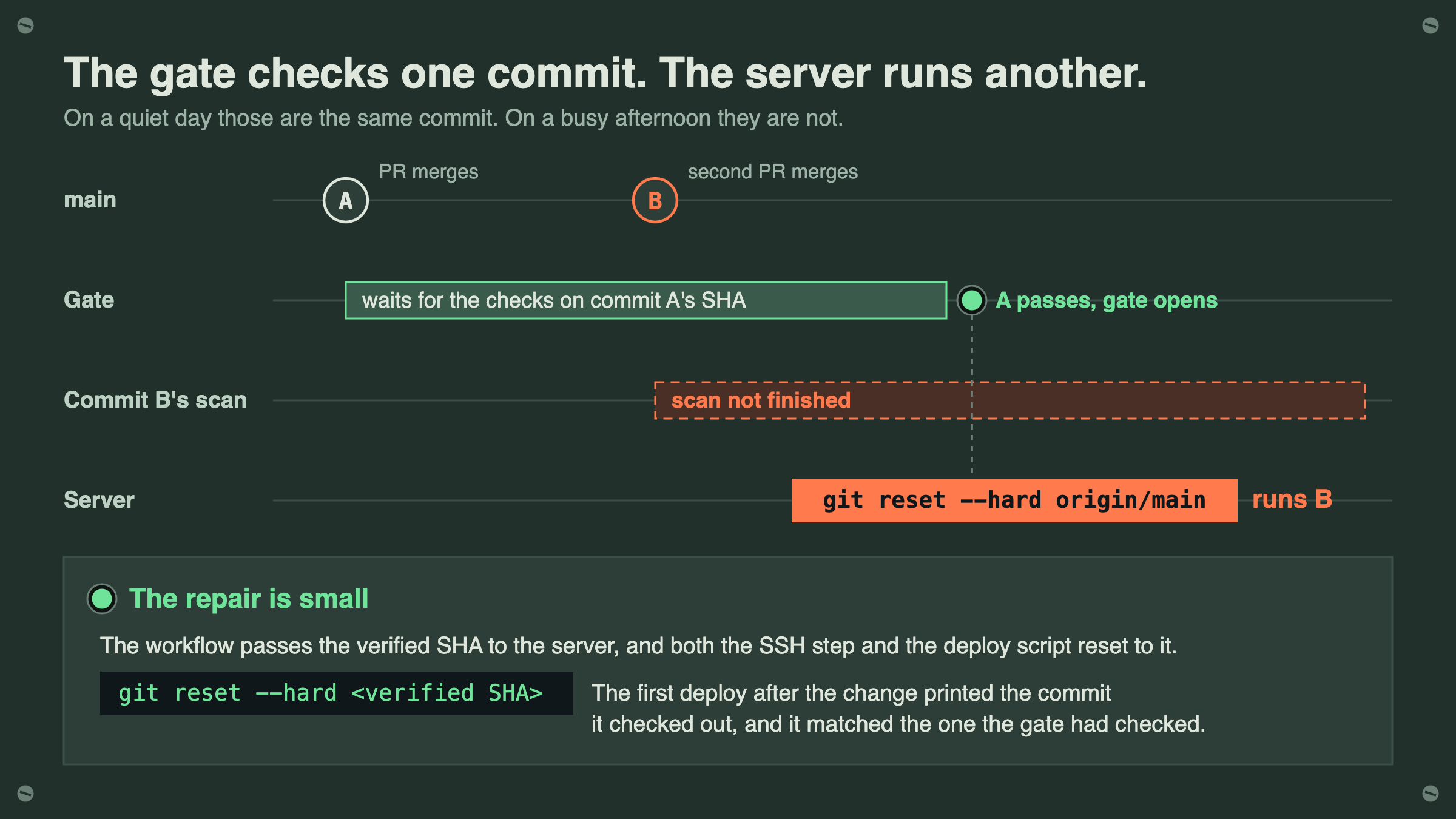
Picture a pull request merging, the pipeline going green, and the deploy job waiting for the security checks on that exact commit before it touches the server. While it waits, a second pull request merges. The checks for the first commit pass, the gate opens, and the server runs git reset --hard origin/main. It is now running the second commit, whose security scan has not finished yet.
Nothing in that sequence is broken in a way a test would notice. The gate did what it was written to do: it found the commit that triggered the workflow and waited for that commit's checks to pass. The deploy script did what it was written to do too, which was to fetch main and reset to it. The gap was between them. One step asked about a commit by its SHA, the next asked git for whatever the branch pointed to at that moment, and on a quiet day those are the same commit. On a busy afternoon they are not.
I found this in a production app I maintain, in a deploy gate I had already fixed once. The first time, a cancelled scan was being read as a pass, so I rewrote the check to accept only an explicit success. That fix was right, and it still left this. The repair this time is small: the workflow passes the verified SHA to the server, and both the SSH step and the deploy script reset to that SHA instead of to origin/main. The first deploy after the change printed the commit it checked out, and it matched the one the gate had checked.
You can check this on any setup that deploys from a branch. Find the commit your gate verified in the log of your last deploy, then look at what the server is actually running:
git -C /path/to/app rev-parse HEADIf your deploy step says origin/main, main or latest anywhere, rather than a SHA it was handed, the two can differ, and the gate is protecting a commit you might not be running.
The scanner that never read a merge commit#
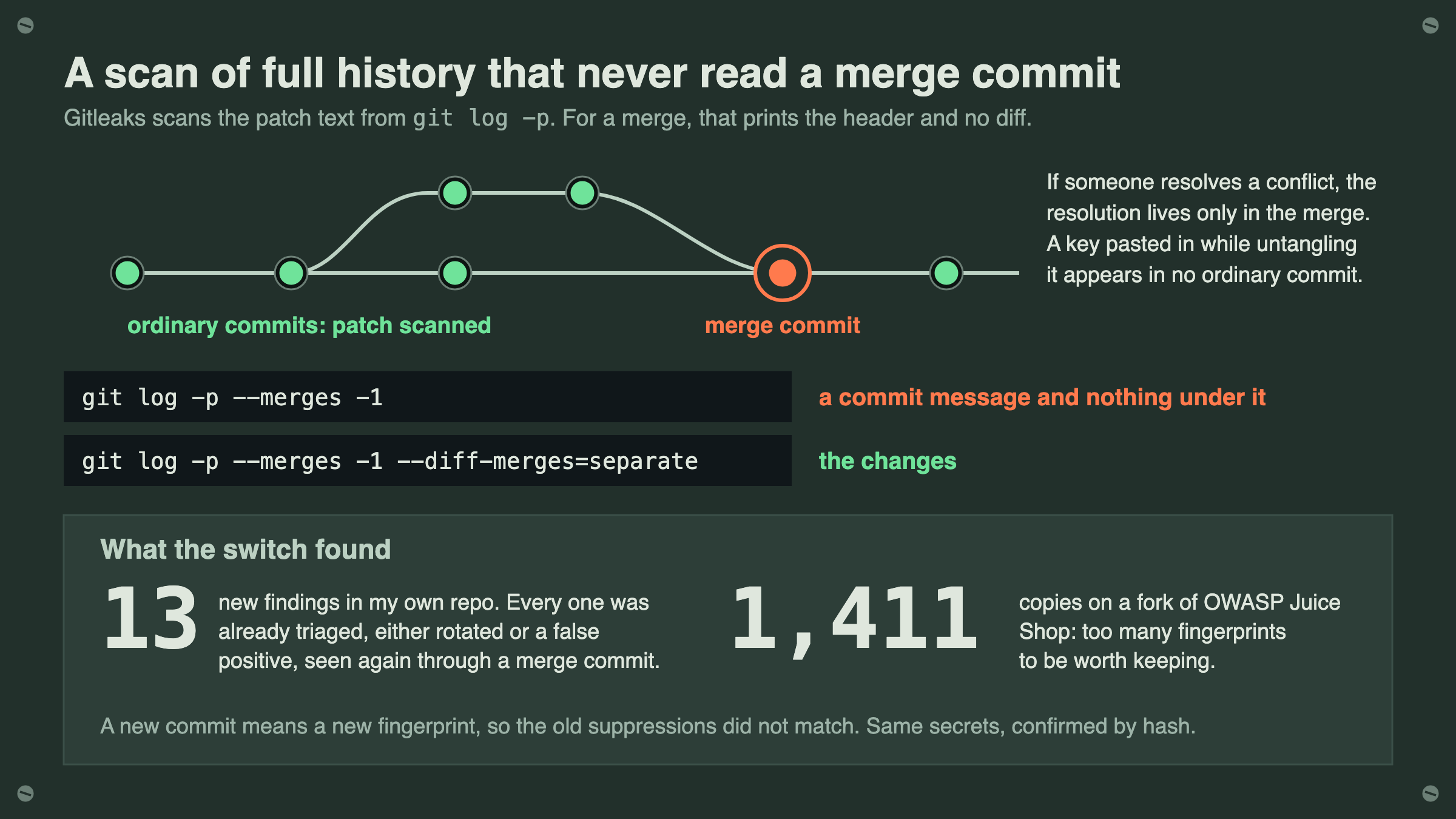
The second one hid inside a scan I trusted more than any other, because it ran over the full git history on every push. Gitleaks reads history by asking git for a patch of every commit, essentially git log -p, and scanning the patch text. That works for ordinary commits. A merge commit is different: by default, git log -p prints the merge's header and no diff at all.
You can see it in your own repository in a few seconds:
git log -p --merges -1
git log -p --merges -1 --diff-merges=separate
The first command shows a commit message and nothing under it. The second shows the changes. That gap matters in one case, but it is a real one: when someone resolves a merge conflict, the resolution lives only in the merge commit. A key pasted into a config file while untangling a conflict is in no ordinary commit, so a scanner that skips merge diffs never sees it.
To be fair to the tool, it did what it was asked, and every non-merge commit had been scanned. The fix is to ask for more: --diff-merges=separate inside gitleaks' --log-opts. Because --log-opts replaces gitleaks' own git arguments rather than adding to them, the defaults have to be restated alongside it. While they are in front of you, drop the t from the default --diff-filter=tuxdb, which excludes type changes, so a symlink turned into a file holding a key is skipped too:
gitleaks detect --source . \
  --log-opts="--full-history --all --diff-filter=uxdb --diff-merges=separate"
Turning it on had a cost I did not expect. The first full-history run reported 13 new findings, and every one was a secret I had already triaged, either rotated or marked a false positive, seen again through the merge commit that carried it into main. A different commit means a different fingerprint, so the old suppressions did not match. I compared each one against the triaged values by hash, without printing any of them, and suppressed them under their own heading. That works for 13. On a fork of OWASP Juice Shop, with years of upstream merges, the same switch produced 1,411 copies, far too many to suppress one by one. The pipeline in my CI/CD lab makes the comparison itself: a merge-commit finding is dropped when the same rule and secret already appear in an ordinary commit, so only a secret that first appears in a merge still blocks.
The rate limiter that saw one visitor#
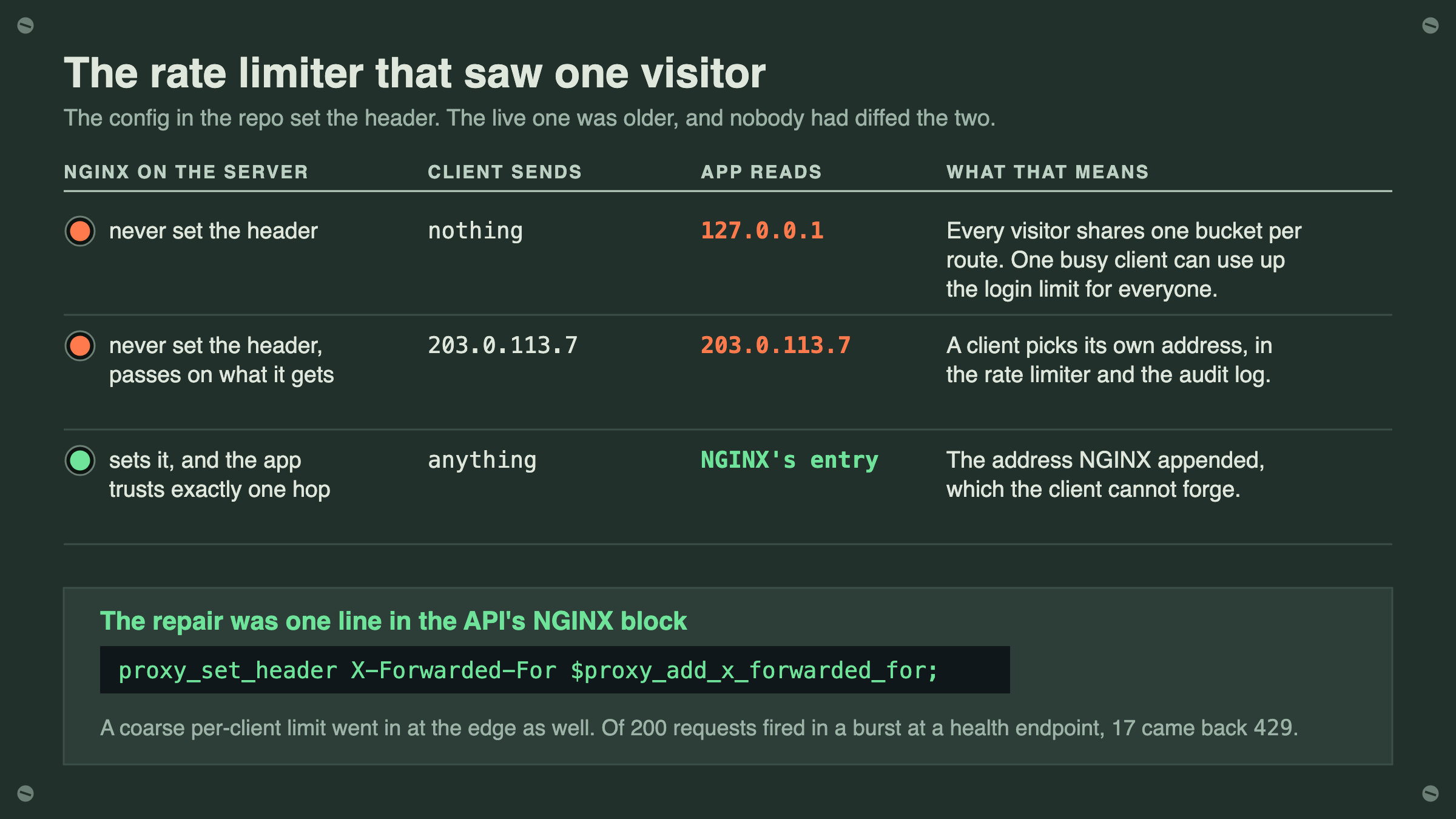
The third one is the one I am least proud of, because I had written the fix and believed it. The API sits behind NGINX, and its rate limiter counts requests per client IP. Behind a proxy, the connection always comes from the proxy, so the app has to be told to trust one proxy hop and read the client's address from the X-Forwarded-For header instead. I had shipped that change weeks earlier, with a comment explaining why the hop count had to be exactly one.
The header itself was the problem. The NGINX config in the repository set X-Forwarded-For on the API. The config running on the server was older, nobody had diffed the two, and the live one never set it. With no header, every request looked like it came from the loopback address, so every visitor shared one bucket per route, and one busy client could use up the login limit for everyone. Worse, an NGINX that is not told to set the header passes on whatever X-Forwarded-For the client sends, so a client could choose the address it was rate-limited as, and the one written into the audit log.
The repair was one line in the API's NGINX block:
proxy_set_header X-Forwarded-For $proxy_add_x_forwarded_for;With the app trusting exactly one hop, the address it reads is the one NGINX appended, which the client cannot forge. That holds only while NGINX is the one way in: if the API's port is reachable directly, a client can send the header itself and be trusted as the hop. While I was in there I added a coarse per-client limit at the edge as well, then tested it from outside: of 200 requests fired in a burst at a health endpoint, 17 came back 429, and the next request a few seconds later was served normally.
The test for your own app takes a minute. Send one request to your own API with a made-up header, then look at the address your logs or audit trail recorded for it:
curl -s -o /dev/null -H "X-Forwarded-For: 203.0.113.7" https://your-api.example/healthIf your logs say 203.0.113.7, a client can choose its own identity in your app. If they say 127.0.0.1, every client is the same person to your rate limiter.
What the three have in common#
None of these was a missing control. Each one was configured, reviewed and passing, and each one rested on a fact that lived somewhere else: the commit the server would fetch, the patch git would print, the header a proxy would send. The checks I had all looked at the control itself, and the control was fine. What failed was the thing next to it, which nobody was checking because it had never been the control.
This does not cover everything nearby. If your app sits behind a CDN or a load balancer as well as NGINX, one trusted hop is the wrong number, and the right one depends on your provider. Scanning merges makes a full-history scan slower: on the Juice Shop fork's 24,210 commits, both scans together took just under two minutes on a laptop, and I have not measured anything larger. And pinning a deploy to a SHA assumes the server can fetch that commit, which is true for a branch-based deploy and worth checking for anything else.
Run the three checks above on whatever you shipped this month. Each one takes under two minutes. If they all come back clean, you have three controls you know are on. If one does not, it has been off for as long as you have been sure it was working.
Likes are saved in your browser only.
This post is also published on dev.to.
Keep reading
- 21 October 20269 minThe three questions you get asked at 2amWhen something goes wrong, three questions get asked and most teams cannot answer any of them. Why application logs are not an audit trail, how the record becomes a liability, and five questions a non-technical leader can ask about it.
- 10 November 20269 minDMARC without breaking your own mailHow I took a small SaaS from a monitoring-only DMARC record to p=reject on evidence: an SPF record one lookup over the limit, DKIM signed in the app, a tag that quietly cancels the policy, and what 3,718 report messages did and did not prove.
- 3 November 20266 minThe AI endpoint that charges you money when somebody abuses itAbuse of a normal endpoint costs you capacity. Abuse of an endpoint that calls a model costs you money per request while everything looks healthy. Four controls, and the quota bug that charges you for every rejection.